
Shopify Coupon Codes: Setup, Types & Best Practices
Learn how to create and manage Shopify coupon codes. Covers all discount types, step-by-step setup, and proven strategies to increase conversions.
Around 65% of shoppers say a discount code will finalize their purchase decision (Giosg). For Shopify store owners, coupon codes are one of the most direct ways to influence buying behavior.
This guide focuses specifically on Shopify's native discount system -how to set up codes, which discount types work for different goals, and the strategies that separate profitable promotions from -destroying ones. We won't cover third-party discount apps, which have their own configuration flows and pricing models.
The recommendations here are based on published benchmarks from sources like Baymard Institute, Klaviyo, and documented case studies from brands using Shopify's discount features.
What Are Shopify Coupon Codes?
Shopify coupon codes are alphanumeric strings that customers enter at checkout to receive a discount. They're also called discount codes or promo codes.
When a customer applies a valid code, Shopify automatically calculates the discount and adjusts the order total. The discount display differs depending on whether your store uses a cart drawer or cart page layout. The code can reduce the price by a percentage, a fixed amount, or trigger special offers like free shipping.
Key takeaway: Coupon codes give you control over who gets discounts and when -making them useful for tracking campaign performance and targeting specific customer segments.
Coupon codes serve multiple purposes:
- Acquire new customers with first-purchase incentives
- Recover abandoned carts through email campaigns
- Reward loyal customers with exclusive discounts
- Track marketing performance by assigning unique codes to channels
- Clear inventory during seasonal promotions
This matters because around 70% of online shopping carts are abandoned before checkout. For a deep dive into why shoppers abandon and how to prevent it, see our complete cart abandonment guide. Coupon codes -particularly when delivered at the right moment -can recover a portion of those lost sales.
Shopify stores can have up to 20 million unique discount codes. This limit applies to all codes ever created, though deleted codes don't count toward the total.
Types of Shopify Discounts
Shopify's official documentation outlines four core discount types. Each serves different promotional goals.
Amount Off Orders
This discount reduces the total order value by either a percentage or fixed amount.
A percentage discount might look like "20% off your entire order," while a fixed amount could be "$15 off orders over $75."
Amount off orders works well for:
- Sitewide sales (Black Friday, seasonal promotions)
- Minimum order thresholds to increase
- Welcome discounts for new subscribers
Key takeaway: Percentage discounts tend to feel more valuable on higher-priced items, while fixed amounts work better for lower cart values where "$10 off" sounds more concrete than "10% off."
Amount Off Products
This discount applies to specific products or collections rather than the entire order.
Example: "30% off all summer collection items"
Use this when you want to:
- Promote specific product categories
- Clear slow-moving inventory
- Highlight new arrivals with launch discounts
You can target individual products, entire collections, or products with specific tags.
Buy X Get Y
This discount type creates bundle incentives. Customers must purchase qualifying items to receive discounted or free products.
Common structures:
- Buy 2, Get 1 Free
- Buy 3 items, Get 20% off the cheapest
- Buy Product A, Get Product B at 50% off
Buy X Get Y discounts encourage larger cart sizes and help introduce customers to .
Free Shipping
Free shipping discounts remove delivery costs, either unconditionally or when order minimums are met.
Example combinations:
- "Free shipping on orders over $50"
- "15% off + free shipping with code SPRING15"
Free shipping thresholds can work well for increasing average order value. Customers often add items to qualify for free delivery rather than pay shipping costs.
Manual Codes vs Automatic Discounts
Shopify offers two delivery methods for discounts: manual codes and automatic discounts. Each has distinct advantages.
Manual Discount Codes
Customers must enter these codes at checkout. You control distribution through email, social media, influencer partnerships, or advertising.
Advantages:
- Track which channels drive redemptions
- Create exclusive codes for specific audiences
- Control who receives the discount
Disadvantages:
- Customers forget codes or mistype them
- Shoppers may abandon checkout to search for codes online
- Lower redemption rates compared to automatic discounts
Automatic Discounts
These apply without customer action. When cart conditions are met, the discount appears automatically.
Advantages:
- Higher uptake rates (no friction at checkout)
- Reduced cart abandonment from code-hunting
- Simpler customer experience
Disadvantages:
- Harder to track
- Less control over distribution
- Limited to 25 active automatic discounts per store
Which Should You Use?
Use manual codes when:
- You need to track campaign performance by channel
- You're working with influencers or affiliates who need unique codes
- You want to create exclusive offers for specific customer segments
Use automatic discounts when:
- Maximizing redemption rate matters more than attribution
- Running sitewide promotions where everyone qualifies
- You want to reduce checkout friction
Key takeaway: Many successful stores use both methods. Automatic discounts handle general promotions, while manual codes serve targeted campaigns where tracking matters.
How to Create Shopify Coupon Codes
Here's the step-by-step process for creating a discount code in Shopify.

Step 1: Access the Discounts Section
From your Shopify admin, go to Discounts in the left sidebar. Click Create discount in the top right.
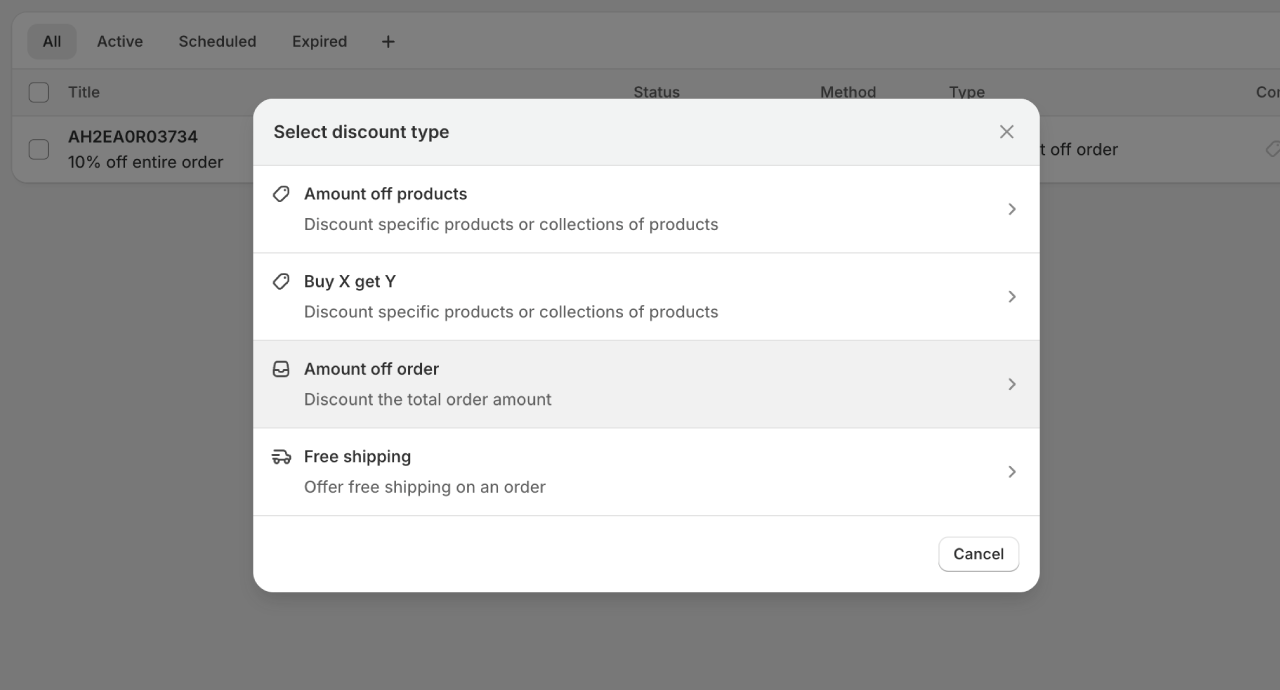
Step 2: Choose Your Discount Type
Select one of the four options:
- Amount off products
- Amount off order
- Buy X get Y
- Free shipping
Your choice determines which configuration options appear next.
Step 3: Select the Discount Method
Choose between:
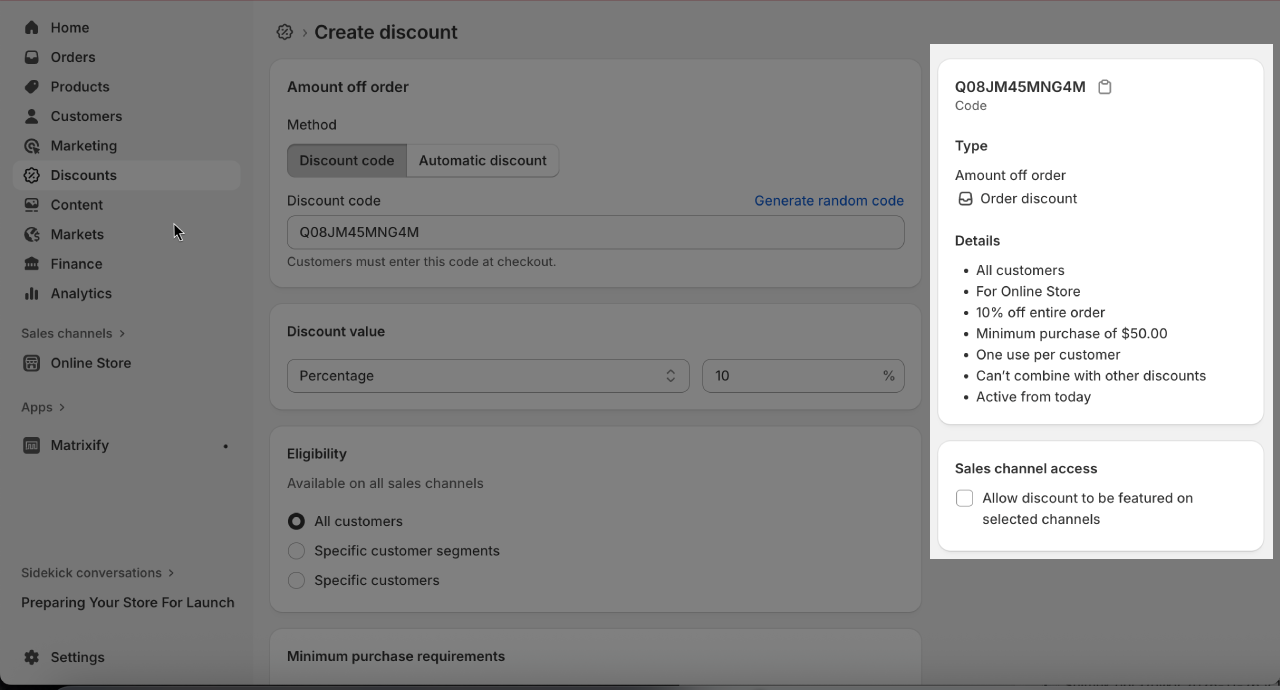
- Discount code - Customers enter a code at checkout
- - Applies automatically when conditions are met
If you select discount code, you'll need to enter the code customers will use. Make it memorable but not easily guessable.
Step 4: Set the Discount Value
Configure the discount amount:
- For percentage discounts: Enter the percentage (e.g., 20%)
- For fixed amounts: Enter the value (e.g., $15)
- For Buy X Get Y: Define the qualifying and discounted items
Step 5: Define Purchase Requirements
Set minimum requirements:
- No minimum - Discount applies to any order
- Minimum purchase amount - e.g., "Spend $50 to qualify"
- Minimum quantity - e.g., "Buy 3 or more items"
Higher minimums can increase average order value but may reduce redemption rates.
Step 6: Set Customer Eligibility
Choose who can use the discount:
- All customers
- Specific customer segments - Based on purchase history, location, or tags
- Specific customers - Individual customer accounts
Note: Eligibility for specific customers or segments requires customers to be logged in.
Step 7: Configure Usage Limits
Set how many times the code can be used:
- Total usage limit - Maximum redemptions across all customers
- Per customer limit - How many times each customer can use it (often set to 1)
Limits help prevent abuse and control promotion costs.
Step 8: Set Active Dates
Define when the discount is valid:
- Start date and time
- End date and time (optional)
Time-limited discounts create . Open-ended discounts risk being forgotten or abused.
Step 9: Review and Save
Check all settings before saving. Once active, the discount code appears in your Discounts list where you can monitor usage.
Shopify Discount Limits to Know
| Limit | Value |
|---|---|
| Maximum active automatic discounts | 25 |
| Discount codes per order | 5 product/order codes + 1 shipping code |
| Specific customers/products per code | 100 |
| Total unique codes per store | 20,000,000 |
Coupon Code Best Practices
Research from Opensend suggests that retailers offering coupons can see up to 50% higher conversion rates. But poorly executed discounts erode margins and train customers to never pay full price.
Here's how to balance conversion gains with profitability.
Use Auto-Apply When Possible
Powr.io research suggests automatically applied discounts tend to convert better than manual codes. Customers don't need to remember codes or hunt for them online.
When you must use manual codes, display them prominently. Don't force customers to leave your site searching for discounts.
Set Clear Expiration Dates
Time limits create urgency. "Valid for 48 hours" typically outperforms "Use anytime" because it triggers action.
Short expiration windows also reduce the risk of codes leaking to coupon aggregator sites.
Send Cart Recovery Emails Within 30 Minutes
Abandoned cart emails with discount codes can recover around 63% of would-be lost customers, ConversionGiant data suggests.
Timing matters. Recovery emails sent within 30 minutes of abandonment increase conversions by over 20% compared to delayed messages. But before any coupon code can work, the email needs to get opened. That's where a strong cart abandonment email subject line becomes critical.
To estimate how much revenue abandoned carts cost your store, use a cart abandonment calculator to see the potential recovery value.
Reserve Deep Discounts for the Right Moments
Regular discounting trains customers to wait for sales. Industry data suggests flash sales can generate 40%+ immediate conversions, but loyalty programs create 90%+ repeat purchase rates (Invesp).
Use significant discounts for:
- Black Friday / major holidays
- New product launches
- Customer win-back campaigns
For ongoing promotions, consider free shipping thresholds or small percentage discounts rather than deep cuts.
Key takeaway: The goal isn't to avoid discounts entirely -it's to use them strategically so customers don't expect them on every purchase.
Make Codes Mobile-Friendly
Over 60% of e-commerce traffic now comes from mobile devices. Your discount codes should:
- Be short enough to type easily
- Work with one-tap application where possible
- Display clear confirmation that the discount applied
Long, complex codes frustrate mobile users and increase checkout abandonment.
Brand Examples: How Top Stores Use Discount Codes
Looking at how established brands structure their discount strategies can reveal patterns worth considering.
Gymshark: Selective Discounting + Influencer Codes
OptiMonk's marketing analysis shows Gymshark takes a "less is more" approach to discounts. Rather than constant sales, they run three major events annually -Black Friday, Summer Sale, and Mid-Season Sale -with discounts up to 70% off.
Their influencer strategy uses unique codes for each ambassador (typically 10% off), allowing them to track conversions by creator. This approach builds community while maintaining premium pricing most of the year.
What to take from this: can make discounts work harder. If customers know sales are rare, they're more likely to act when one happens.
Fashion Nova: High-Volume Code Distribution
Fashion Nova releases approximately 6.6 discount codes per month on average, distributed through email, influencers, and app notifications. Their 30% off codes are nearly always available through some channel.
This approach works for their fast-fashion positioning where frequent purchases and low prices are the expectation.
What to take from this: Your discount strategy should match your brand positioning. What works for fast fashion may damage a premium brand.
ASOS: Tiered Programs + Student Focus
ASOS combines several discount approaches: student discounts (10% off through verification), new customer offers (15-20% off first order), and a Premier membership ($19.99/year for free shipping). They also run regular site-wide sales with codes distributed through email.
Notably, ASOS limits customers to one discount code per order -preventing stacking that could erode margins.
What to take from this: Different discount programs can target different customer segments. Students, new customers, and loyal members each get tailored offers.
Common Coupon Code Mistakes
Avoid these errors that cost stores revenue and margin.
Mistake #1: Letting Codes Leak to Coupon Sites
Staff codes, influencer codes, and email-exclusive discounts frequently end up on sites like RetailMeNot or browser extensions like Honey. Voucherify reports this is one of the most financially damaging issues facing e-commerce marketers. Customers who would have paid full price get discounts, and your attribution data becomes unreliable.
To prevent leaks:
- Use single-use codes with randomized characters
- Set per-customer usage limits
- Monitor coupon sites for your codes
- Set short expiration windows
Mistake #2: Making Codes Too Guessable
Codes like "SAVE10" or "FREESHIP" are easily guessed or brute-forced. Unauthorized discounts eat into margins and you have no idea where the "leak" is coming from.
Use codes that combine random letters and numbers instead. Avoid common words and predictable patterns. Need to generate secure, randomized codes in bulk? A coupon code generator can create unique codes that are hard to guess while still being easy to type.
Mistake #3: No Stacking Controls
Without proper configuration, customers may stack multiple discounts -a 20% code plus free shipping plus a buy-one-get-one offer. Combined discounts can exceed your target margin.
Configure which discounts can stack and which override others. Shopify's discount combinations settings let you control this.
Mistake #4: Forgetting to Track Performance
Using the same generic code for everything means you can't see which channels actually drive sales. Without that visibility, optimizing your discount strategy becomes guesswork.
Create unique codes for each channel instead:
- EMAIL10 for email campaigns
- INSTA15 for Instagram
- PODCAST20 for podcast sponsorships
- EXITPOP for exit intent popups
Review redemption data regularly to identify which channels deliver profitable customers.
Mistake #5: Running Discounts Too Frequently
Constant promotions train customers to expect discounts. When that expectation sets in, they stop buying at full price -destroying both margin and brand positioning.
Limit major discounts to genuine events instead. Use value-adds like free shipping or bonus products rather than percentage discounts for ongoing promotions.
Tiered and FOMO Discount Strategies
Advanced discount structures can increase average order value beyond simple percentage-off promotions. To set tiers that actually stretch the basket, start from typical order values in your industry.
Tiered Discounts
Tiered discounts reward higher spending with bigger savings:
- Spend $50, get 10% off
- Spend $100, get 15% off
- Spend $150, get 20% off
ConvertCart analysis found that Shopify stores using tiered discounts see an average 32% increase in average order value.
Key takeaway: Tiered structures work because customers often add items to reach the next threshold rather than leave savings on the table.
Countdown and Limited-Time Offers
These tactics work because of the same psychological mechanisms behind : , scarcity, and . For how to implement them without damaging trust, see our FOMO marketing guide.
FOMO-based tactics create urgency:
- "20% off for the next 4 hours"
- "First 100 orders get free shipping"
- Decreasing discount over time (20% → 15% → 10%)
Display countdown timers on product pages and in cart. The visual countdown reinforces scarcity.
For maximum impact, combine countdown offers with exit intent popups that trigger when visitors show signs of leaving.
Flash Sales
Short, announced-in-advance sales generate concentrated traffic and purchases. The combination of limited time and promoted savings drives action.
Best practices for flash sales:
- Announce 24-48 hours in advance to build anticipation
- Keep duration short (4-24 hours)
- Focus on specific products or categories
- Track performance to compare against regular promotions
What Results to Expect
Redemption Rate Benchmarks
E-commerce coupon redemption rates typically range from 1% to 15%, with around 7% considered a solid benchmark (DemandSage). Digital coupons have approximately 10x higher redemption rates than paper alternatives.
Factors That Affect Performance
Your results will depend on:
- Discount value: Higher discounts typically drive more redemptions but lower margins
- Audience targeting: Exclusive codes for engaged customers outperform broadcast discounts
- Timing: Urgency-driven campaigns often see higher conversion rates
- Distribution channel: Email typically outperforms social media for discount code delivery
How to Measure Success
Track these metrics:
- Redemption rate: Codes used ÷ codes distributed
- Revenue per code: Total revenue from discounted orders
- Customer : Factor in the discount value when calculating
- : Do discounted customers come back at full price?
Frequently Asked Questions
How many discount codes can customers use per order?
Customers can use up to 5 product or order discount codes plus 1 shipping discount code on a single order. This limit applies to both manual codes and automatic discounts combined.
What's the difference between a coupon code and an automatic discount?
A coupon code requires customers to enter an alphanumeric string at checkout. An automatic discount applies without customer action when cart conditions are met. Automatic discounts tend to have higher redemption rates but are harder to track by marketing channel.
Can I limit a discount code to first-time customers only?
Yes. When creating the discount, set customer eligibility to "Specific customer segments" and select customers who haven't purchased before. Note that this requires customers to create an account or be logged in.
How do I prevent coupon code abuse?
Use single-use codes with randomized characters, set per-customer usage limits, configure short expiration dates, and monitor coupon aggregator sites for leaks. For high-value discounts, consider using apps that block coupon browser extensions at checkout.
What's a good coupon redemption rate?
E-commerce coupon redemption rates typically range from 1% to 15%, with around 7% considered a solid benchmark based on DemandSage data. Your specific rate will depend on discount value, audience targeting, and distribution channel.
Summary
Shopify coupon codes can measurably improve conversions when used strategically. The four discount types -amount off orders, amount off products, Buy X Get Y, and free shipping -serve different promotional goals.
Key points to remember:
- Automatic discounts tend to convert better than manual codes due to reduced friction
- Set usage limits and expiration dates to prevent abuse
- Reserve deep discounts for major events to protect margins
- Tiered discounts can increase average order value by around 30%
- Track performance by channel to optimize your strategy
Whether you're recovering abandoned carts or running seasonal promotions, well-structured discount codes can measurably improve your store's .
Want to identify checkout issues that might be hurting your conversions? Run a Shopify store audit with EcomHint to find optimization opportunities.

Jakub is the founder of Ecomhint, an AI-powered ecommerce audit tool focused on UX and conversion optimization. He helps online stores identify friction points across product pages, cart, and checkout using CRO best practices and original research data.
