Free WooCommerce SEO audit

Find out what is keeping your products out of search. Every issue comes back with the fix for it, written for WooCommerce.

Free • No signup • Results in about 30 seconds • WooCommerce-specific fixes

SEO checks tuned for WooCommerce

WooCommerce SEO runs through plugins like Yoast or Rank Math. This audit checks whether they are actually outputting the sitemap, schema, and meta your store needs, plus the signals generic tools ignore.

Indexability & Crawl9/10 pass92

Page is indexable (no noindex)

No noindex directive found.

Canonical tag present and valid

Canonical points to this page.

robots.txt valid and references sitemap

robots.txt exists but does not reference a sitemap.

XML sitemap reachable

The sitemap loaded successfully.

Indexability: robots.txt, sitemap, canonical, and noindex

One ticked box in Settings then Reading puts noindex on every page, and it often survives a move from staging. This reads the tag your storefront actually served, plus the sitemap and canonical.
On-Page & Meta4/7 pass69

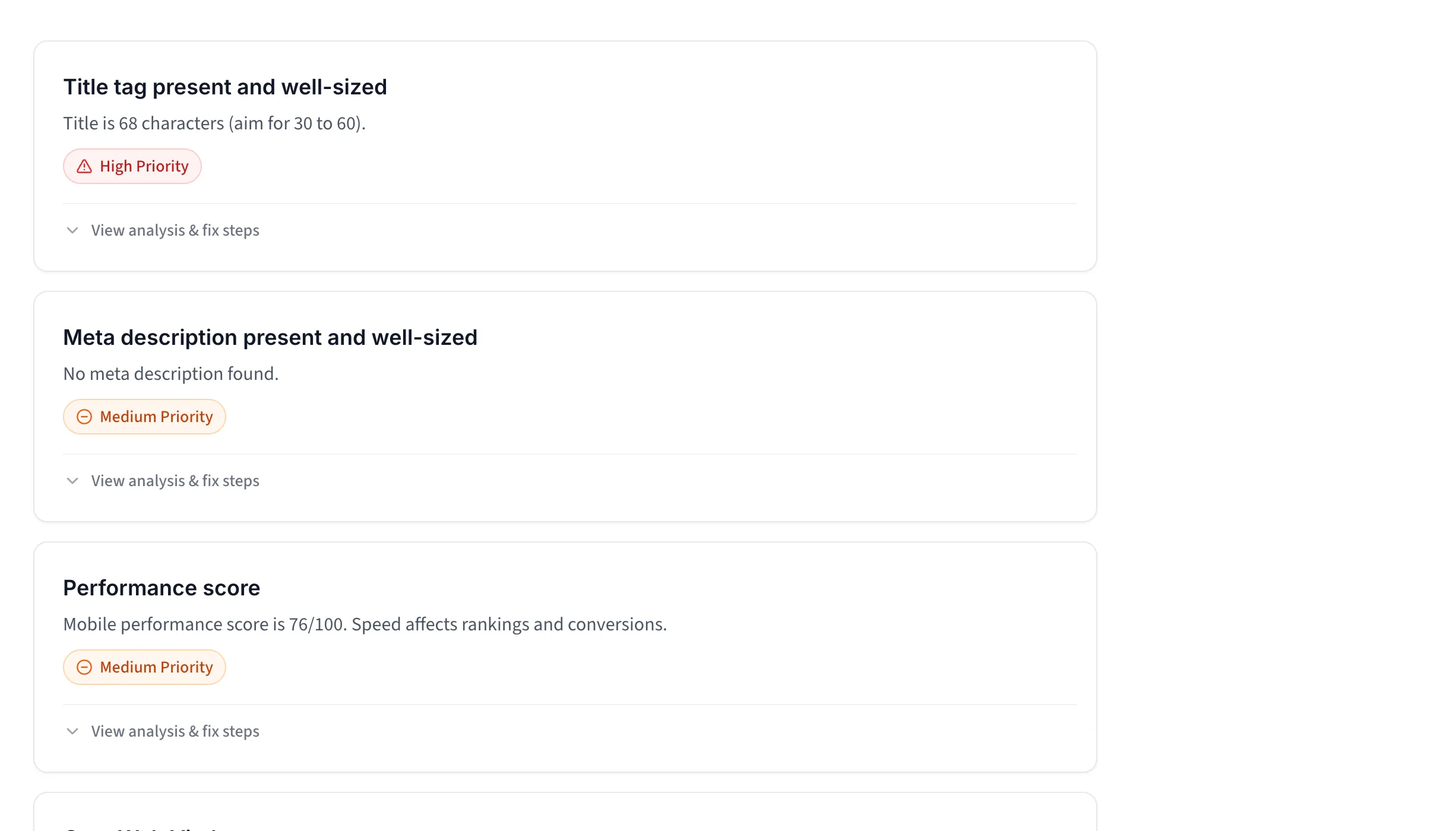
Title tag present and well-sized

Title is 68 characters (aim for 30 to 60).

Meta description present and well-sized

No meta description found.

Mobile viewport set

Mobile viewport meta tag is set.

Open Graph tags for social sharing

Only 2 of 3 core Open Graph tags are set.

On-page SEO: title tags, meta descriptions, and Open Graph

On WooCommerce your titles and meta descriptions usually come out of a template rather than the page itself, so what a template produces and what ships can differ. This reads what the page served.

Structured Data3/4 pass83

Structured data present

JSON-LD structured data was detected.

Product schema with price and availability

Product schema is present but missing availability.

Breadcrumb schema

Breadcrumb data was detected.

Structured data: Product schema, price, and availability

WooCommerce writes Product markup itself, with availability, on product pages but not on category archives, and an SEO plugin then builds on it. This reads what came out the other end.

Technical & Speed2/4 pass61

Performance score

Mobile performance score is 58/100. Speed affects rankings and conversions.

Core Web Vitals

LCP 1.8 s, CLS 0.01, INP 79ms (real-user data for this page, last 28 days).

Text compression enabled

No text compression detected on the HTML response.

No mixed content

No insecure http resources detected.

Technical SEO: Core Web Vitals, HTTPS, and compression

On WooCommerce the host, the theme, and every active plugin all pull on these numbers. This measures what your storefront served, not what a plugin claims.

Every issue with clear next steps

Every failed check comes with the fix for it, written for WooCommerce.

Prioritized WooCommerce SEO findings shown as collapsed cards

Know what to fix first

Failed checks and warnings are ranked by impact, so you can focus on the changes most likely to help.

  • The issues most likely to hold the page back rise to the top.
  • Every card shows its status, priority, and finding.
  • Open any result for context, fix steps, and useful tools.
Run WooCommerce SEO Audit

Analysis

WooCommerce outputs Product markup itself, and most stores add an SEO plugin on top of it. We read this page and found Product schema present but missing the availability field.

Why it matters

Without availability in the markup, Google cannot show stock beside your listing, so the product rich result stays incomplete.

Target

Product schema with price, availability, and reviews

Include price, priceCurrency, availability, and, where genuine, aggregateRating. Match the visible values.

How to Fix

  1. 1. Confirm the availability field is present. WooCommerce outputs Product schema by default, so view source and check offers.availability.
  2. 2. Rule out a second Product block. Some themes, or a second SEO plugin, add their own Product schema that conflicts, so keep only one source.
  3. 3. Validate the product URL in the Rich Results Test to see exactly what Google reads.
Recommended tools

Yoast SEO — WordPress SEO plugin with content analysis, schema, and XML sitemaps.

Rich Results Test — Checks which Google rich results your structured data qualifies for.

See what is wrong and how to fix it

Each check explains what we found, why it matters, and the steps you can take next.

  • We explain the result in plain English and show you the affected part of the page.
  • Learn how the issue can affect search visibility, accessibility, or the shopping experience.
  • Check the expected setup, value, or range before you make a change.
  • Get steps for WordPress and your theme, plus tools when they can make the job easier.
Check my store's SEO

How to audit your WooCommerce store

From a store URL to a fix list you can work through in WordPress admin.

  1. 1

    Enter your store URL

    Paste your store URL. We read the live page, your robots.txt and , and run Google Lighthouse on the storefront your visitors see.
  2. 2

    Review your SEO score

    Get one score out of 100, plus a score per area, including the , Product schema and meta tags WooCommerce or a plugin should output.
  3. 3

    Read every check

    Each of the 30+ checks comes back as a pass, a warning, or a fail, with the exact finding from your storefront rather than a generic rule.
  4. 4

    Follow the fix list

    Issues are ranked by impact. Each one says where the change happens: WordPress settings, Yoast or Rank Math, your theme, or the product itself.

Choose the audit for your next step

Start here for a free SEO snapshot of one page. Run the full store audit when you want the whole conversion picture.

WooCommerce SEO audit

Free

Instant, single-page SEO check.
No signup.

  • Indexability, canonical, and robots.txt
  • Titles, meta, and Open Graph
  • Product schema and breadcrumbs
  • Core Web Vitals (LCP, CLS, INP where available)
  • Prioritized, WooCommerce-specific fixes
  • How easy your store is to use and trust
  • How your cart and checkout work

You are using this free tool now.

Full WooCommerce store audit

Recommended
$19one time

An AI review running 80+ checks across your homepage, product pages, and cart.

  • SEO, UX and mobile, accessibility, speed, and trust
  • Homepage, product pages, and your real cart page
  • Your screenshot, a how-it-should-look mockup, and fix steps
  • WooCommerce plugin recommendations
  • Scored and ranked by priority
Run the full audit

On Shopify instead? The Shopify SEO audit adds theme JSON-LD and robots.txt checks.

Questions, answered plainly

What WordPress already ships, what Yoast or Rank Math adds, and what is still on you.

What does this WooCommerce SEO audit check?

We run 30+ checks across indexability (robots.txt, , canonical, noindex), on-page and meta (title, , Open Graph), content (H1, image alt text, ), structured data (Product, Organization, Breadcrumb), and technical health (HTTPS, Core Web Vitals). On WooCommerce these signals come from WordPress, WooCommerce itself, and whichever SEO plugin is installed, so we read what actually reached the page rather than what any of them is meant to produce. For a manual run-through, the WooCommerce SEO checklist covers the steps.

How do you do SEO on WooCommerce?

Start with an SEO plugin. WordPress and WooCommerce give you the basics, a and basic Product schema, but not the control layer, so Yoast SEO or Rank Math is step one: it adds editable meta and title templates, sitemap cleanup, , and managed Product schema. From there the work is yours: unique titles and descriptions, image alt text, clean product and category URLs, , and useful copy. This audit shows which of those are missing. The WooCommerce SEO checklist walks through each step.

Should I use this or the full WooCommerce store audit?

Use this for a fast, free SEO-only snapshot of a page in seconds. Run the full WooCommerce store audit when you want the bigger picture: 80+ checks across SEO and AI-search readiness, and mobile, content, accessibility, speed, and trust, scored and prioritized. The two work together. This one finds SEO gaps; the store audit finds why visitors are not buying.

Which SEO plugin is best for WooCommerce?

The two standard choices are Yoast SEO and Rank Math. Both generate XML sitemaps, and description templates, , and Product structured data. Pick one, not both, since running two SEO plugins causes duplicate schema and conflicting tags. Our Yoast and Rank Math comparison covers where they differ in practice. Start with this free audit to see what needs fixing, then set up a single plugin to close the gaps.

How do I check my WooCommerce store SEO myself?

Open a product and a category page and check the title, , H1, and image alt text. Then confirm your loads, your site is set to indexable in WordPress (Settings then Reading), and your plugin outputs Product structured data. Google Search Console and the Test cover the rest. Our WooCommerce SEO checklist walks through it step by step.

How do you audit a WooCommerce store?

Work through the storefront in order: confirm the site is indexable and the is live, check titles, meta, and Product schema on product and category pages, review site speed and Core Web Vitals, then look at trust and checkout. We cover the SEO and technical side in one click; the WooCommerce SEO checklist lists the manual steps, and the full store audit adds conversion, trust, and .

What is the difference between an SEO audit and a speed audit?

An SEO audit checks whether search engines can find, crawl, and rank your store: titles, meta, structured data, , and robots.txt. A speed audit checks how fast pages load, through Core Web Vitals and render-blocking scripts. WooCommerce runs on WordPress, so caching and plugin weight matter a lot here. For the speed side, run our website speed test.

Will fixing these issues improve my Google rankings?

Fixing technical and on-page gaps removes things that can hold a store back, like a missing title, a noindex tag, or incomplete Product schema. Rankings also depend on content quality and links, so this is one part of the picture rather than a guarantee. The audit tells you which fixable gaps exist today.

Is this WooCommerce SEO audit free?

Yes, completely free, with no signup and no credit card. Agencies charge from a few hundred dollars for a WooCommerce store audit, and most free tools email you a PDF later. This one runs instantly in your browser and shows the full report on screen, with every check and a prioritized fix list.
1400+ stores audited

Want the full WooCommerce picture?

SEO is one layer of it. The free store audit also covers conversions, accessibility, mobile and trust signals.

Free preview  •  No credit card  •  Nothing to install