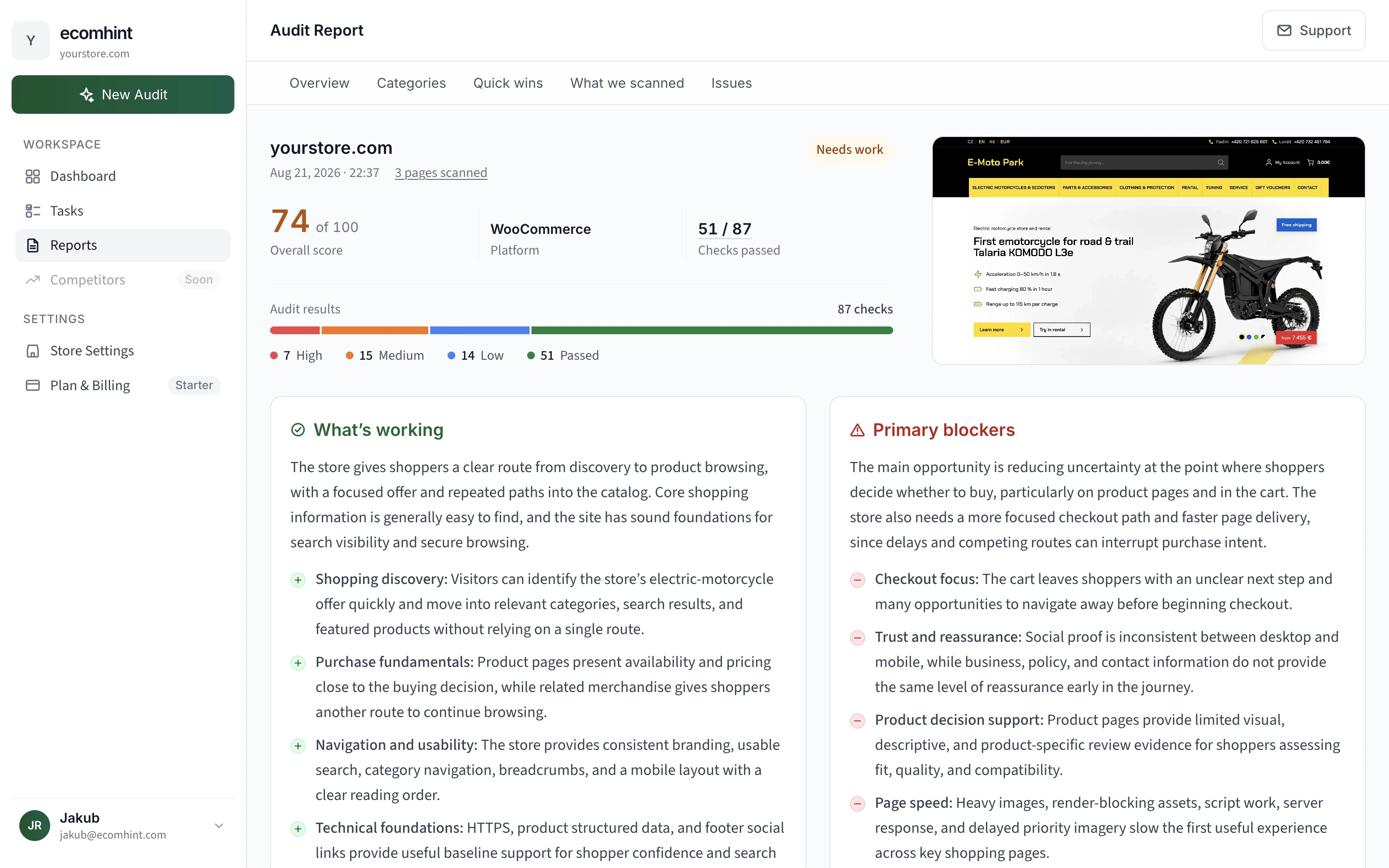
Pick an area or a page type to find out what we look for.
SEO & AI
Check whether search engines and AI tools can find and understand your store. We review the signals that help your pages appear in relevant results.
UX & CRO
Find out whether shoppers can browse, trust the details and buy without hesitation, on desktop and mobile.
Performance
Find what makes pages slow or unstable. We trace the cause from the assets a shopper loads to the server and code behind them.
Accessibility
Spot barriers that can make your store harder to see, understand or use. We review how content and controls work for different shoppers.
Tech & Security
Confirm the store runs on secure connections and clean markup that search engines and browsers can read.
Trust & Legal
Check whether your store looks credible, with the proof, contact details and policies shoppers expect.
Homepage
Find out whether the first screen explains your offer, earns trust and gives shoppers a clear next step on desktop and mobile.
Product pages
Check whether shoppers can understand the product, trust the details and add it to cart without hesitation. We also review how the page is structured for search.
Cart
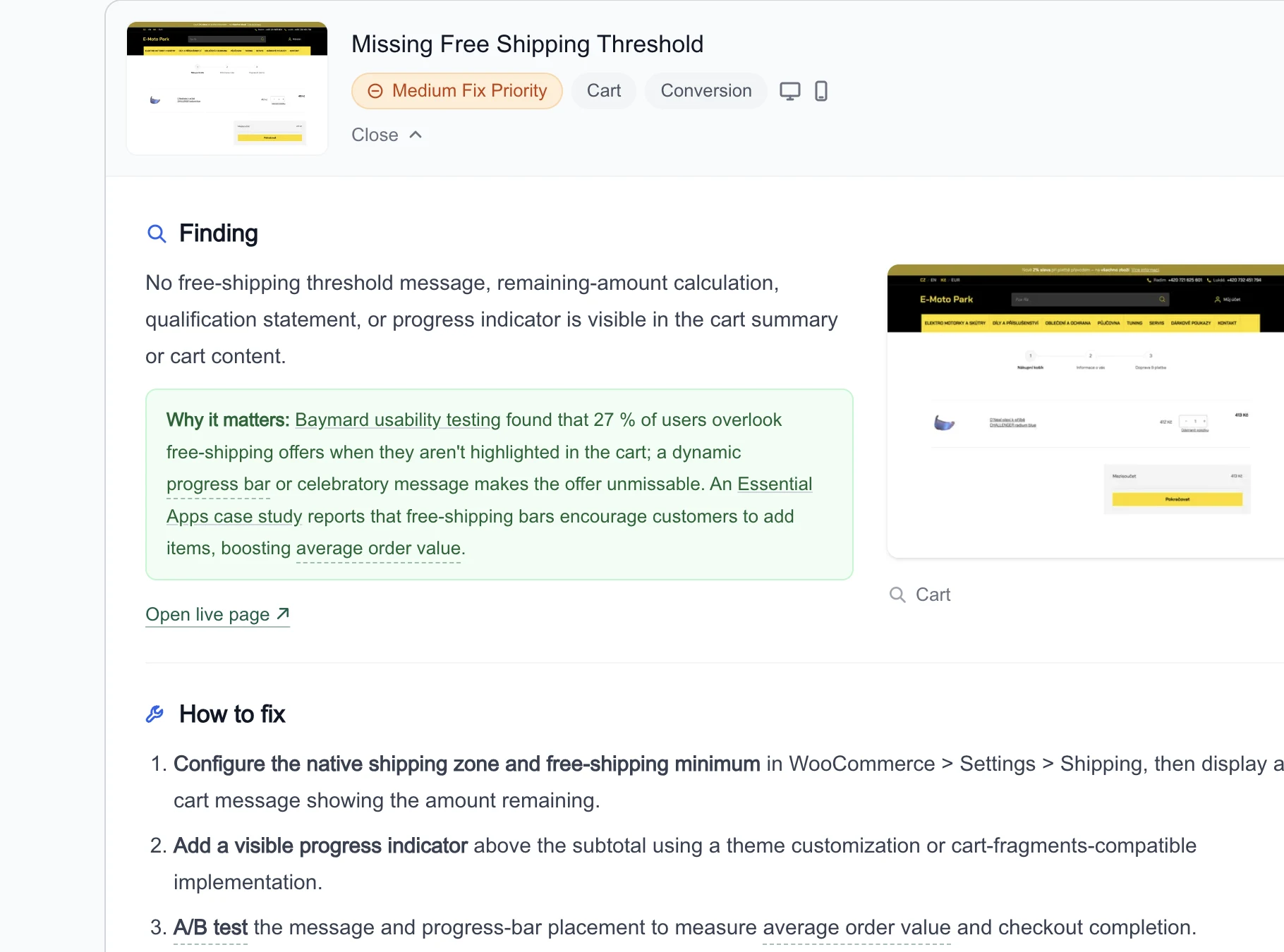
We add a real product and open the actual cart, then check whether totals, shipping progress and item controls stay clear.
Storewide
Keep the whole store easy to find, fast to use and safe to shop. We check how search engines understand it, how it performs for shoppers and how consistently its shared navigation works.
Proof and fix sit on one card, so you never lose the thread.
Understand why the check failed
Every verdict shows the part of your page it was based on, so you can judge it yourself.
How to fix
Configure the native shipping zone and free-shipping minimum in WooCommerce > Settings > Shipping, then display a cart message showing the amount remaining.
Add a visible progress indicator above the subtotal using a theme customization or cart-fragments-compatible implementation.
A/B test the message and progress-bar placement to measure average order value and checkout completion.
Recommended tools
WordPress Customizer — Preview and publish theme changes from the WordPress admin.
Chrome device mode — Preview your store on phone-sized screens before publishing.
How it should look
Desktop
Mobile
Cart
You're only $12 away from FREE SHIPPING
CHECKOUT
A progress bar above the cart items showing the amount still missing for free shipping, which turns a threshold into a reason to add one more item.
Get steps that fit your store
Fix steps come written for your platform, so a WooCommerce store gets WooCommerce steps.
The report tells you what to fix. With a subscription, every fix lands in one list sorted by impact, the next audit confirms which changes worked, and every store you run gets its own list.
Fix-it list
From your Jul 3, 2026 audit
5 of 28 tasks done
3 awaiting re-audit · 2 verified · 3 dismissed
To do
20sorted by impact
+ Add task
Search Box Could Be Easier to Find
High
Done
3
awaiting re-audit
Search Box Could Be Easier to Find
High
Marked done Jul 5 verifies on next audit
Verified
2
confirmed by re-audit
Search Box Could Be Easier to Find
High
Verified by Jul 7 audit
Move one issue from To do to Verified
The finding, evidence and fix steps stay with the task, so you can return to the same context when you are ready to make the change.
Mark it Done when the change is live. A later audit moves it to Verified if the check passes, or back to To do if it does not.
Score Progress
1007550250
Jul 370▲ 2
Mar 20May 1Jun 12Jul 1Jul 3
Track what changed after each re-audit
Every re-audit adds another point to your history. Switch between score and open issues to see whether the store is moving in the right direction.
If a verified issue returns in a later audit, its task moves back to To do.
Projects
4 stores · credits shared across all of them
+ New project
yourstore.com
Active
70▲ 2
3d ago4 High14 Med7 Low
kettleandclay.com
86▼ 1
5d ago1 High6 Med5 Low
alpinegear.shop
58▲ 5
Jun 286 High17 Med9 Low
brightbrew.shop
No audit yet
Run first audit
Keep every store's work apart
Each store you audit becomes its own project, with its own reports and task list. Switch between them from the sidebar, and a fix for one shop never lands in another one's list.
Your audit credits work on any of them, and the Projects page shows every store's score and open issues side by side, so you know which one needs attention first.
A subscription includes Ecomhint MCP. Ask about a finding and work out the next step with evidence from your store, then mark the task done or start the next audit without leaving the chat.
The audit found your review summary beside the product title on desktop, but not in the mobile layout.
Show that same summary below the title on mobile and link it to the reviews. Then check the page on a phone to make sure shoppers can see the rating before they scroll.
Visual example based on an Ecomhint audit.
What to know before you start
How checks are chosen, what evidence you get, which option fits and how we confirm a fix.
No. We have 80+ checks and run the ones that fit your platform, your public pages and the shopping features we find. We support Shopify, WooCommerce and Shoptet.
What will I see behind a finding?
A detailed finding can include the exact page element, a page capture, measured data or observed page behavior. It keeps what we found, why it matters, the priority and the fix guidance together. Relevant tools and visual examples appear when they add useful context.
Do I need technical skills to act on the report?
No technical knowledge is needed to understand the report or choose where to start. We explain each issue in plain English and put the steps in order. Some changes can be made in your platform or theme settings. Others may need a developer, and the report gives you the context to hand the work over.
Will the audit access or change my live store?
No. We read your storefront the way a shopper does, and add a real product to the cart to inspect the shopping journey. We do not install anything, access your admin or read customer, order or payment data. Nothing is changed on your store.
Can I audit a store that isn't live yet?
Yes. We can audit a store that is still behind a password, so you catch issues before launch. Enter the Shopify storefront password or basic auth login when you start the audit. Signed out, we use it for that audit only. Signed in, we save it encrypted in that store's Store Settings for the next audit. One limit: page speed and Core Web Vitals run through Google's tools, which cannot sign in, so those are skipped until you launch.
How do I confirm that a fix worked?
With Full Access, mark the task done and run another audit. If the same check passes, we mark the task as Verified. If it still fails, the task returns to To do. Your history also shows how the score and open issues change over time.
Which audit option should I choose?
Start with the free preview. Choose Single Report for $19 when you want every result from one audit. Choose Full Access at $29 a month to keep fixing and checking. It adds 10 audit credits for any store, tasks, verified fixes, score history and MCP for Claude and ChatGPT. Compare plans.
Can I audit more than one store?
Yes. Audit credits work on any store, and each store keeps its own reports and tasks, so work on one never mixes with another. One audit runs at a time per account.
Can I use the audit inside Claude or ChatGPT?
Yes, with a subscription. Connect Claude or ChatGPT to ask what to fix first, talk a fix through with evidence from your store, update tasks and start audits. Audit credits work on any store, on the web and in chat. See how Ecomhint MCP works.
1400+ stores audited
Know what to fix first
Enter your store URL. We’ll check the shopping journey and show you where to start.
Free preview • No credit card • Nothing to install