Address Validation for Ecommerce: Tools, Costs & Setup (2026)
How to add address autocomplete and validation to your checkout: the difference between them, why shoppers should be able to override a failed check, what Google and other providers cost in 2026, and Shopify and WooCommerce setup.
A shopper types "123 Main St, Springfeld" at checkout, the order ships, and the parcel comes back. Address validation exists to catch that typo before the order is placed. The short version of how to do it well: use autocomplete so shoppers type less, check the address when they press Continue, and let them keep their own address if it still doesn't validate on the second try. That last rule comes straight from Google's own checkout guidance.
The problem is common enough to plan for:
- About 9% of test orders had typos or misspellings in the , in one round of Baymard Institute's checkout testing with more than 150 orders placed.
- Around 47% of ecommerce sites don't use an address validator at all, Baymard's 2023 benchmark found.
- About 8% of first-time US deliveries fail, at an average cost of $17.20 each, estimated the 304 retail executives in the US, UK and Germany that Censuswide surveyed in December 2020 for Loqate's 2021 report. Loqate sells address tools, and the figures are retailers' own estimates, so treat them as a rough scale.
This guide explains how autocomplete, validation and address verification differ, and when to let shoppers override a failed check. It also covers what the tools cost after Google's 2025 pricing change and how to set them up on Shopify and WooCommerce.
Autocomplete, Validation and Verification: What's the Difference?
The three terms get used interchangeably, but they solve different problems.
- Autocomplete — suggests full addresses as the shopper types and fills in the city, state and ZIP code. It speeds up entry and cuts down on typos.
- Validation — checks the entered address against postal data and returns a verdict you can map to fix, confirm or accept. It catches missing apartment numbers and wrong ZIP codes.
- Address verification — often used for the same thing; some providers reserve it for confirming that an address is deliverable, down to the unit.
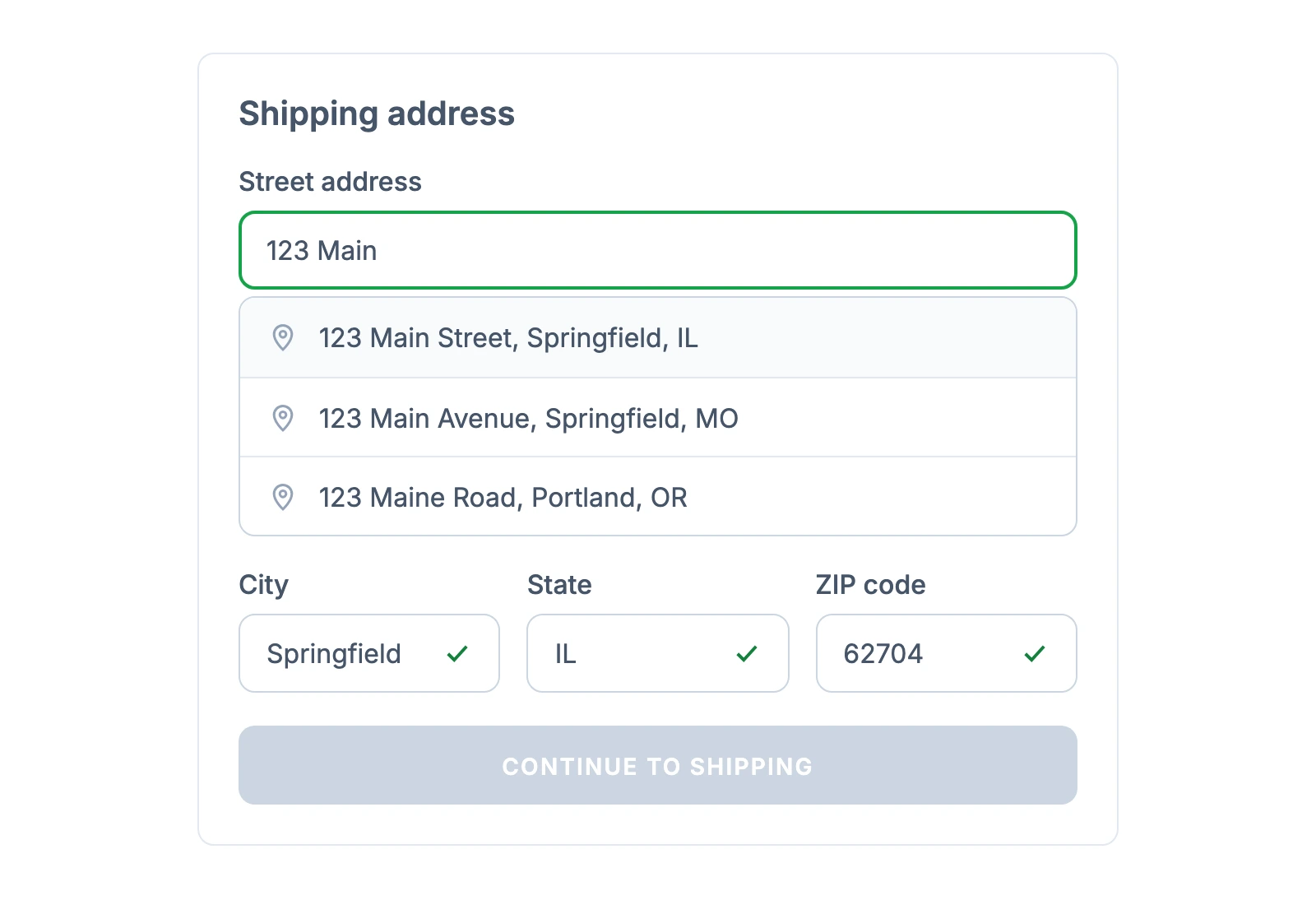
Most stores benefit from both autocomplete and validation. Autocomplete prevents the easy mistakes; validation catches what autocomplete can't, such as a street number that doesn't exist or a missing unit number in a large building. Google's checkout guide recommends autocomplete on the first address line and validation when the shopper clicks Next or Continue.
A validator's answer usually falls into one of three buckets, which Google calls Fix, Confirm and Accept. Each needs a different message:
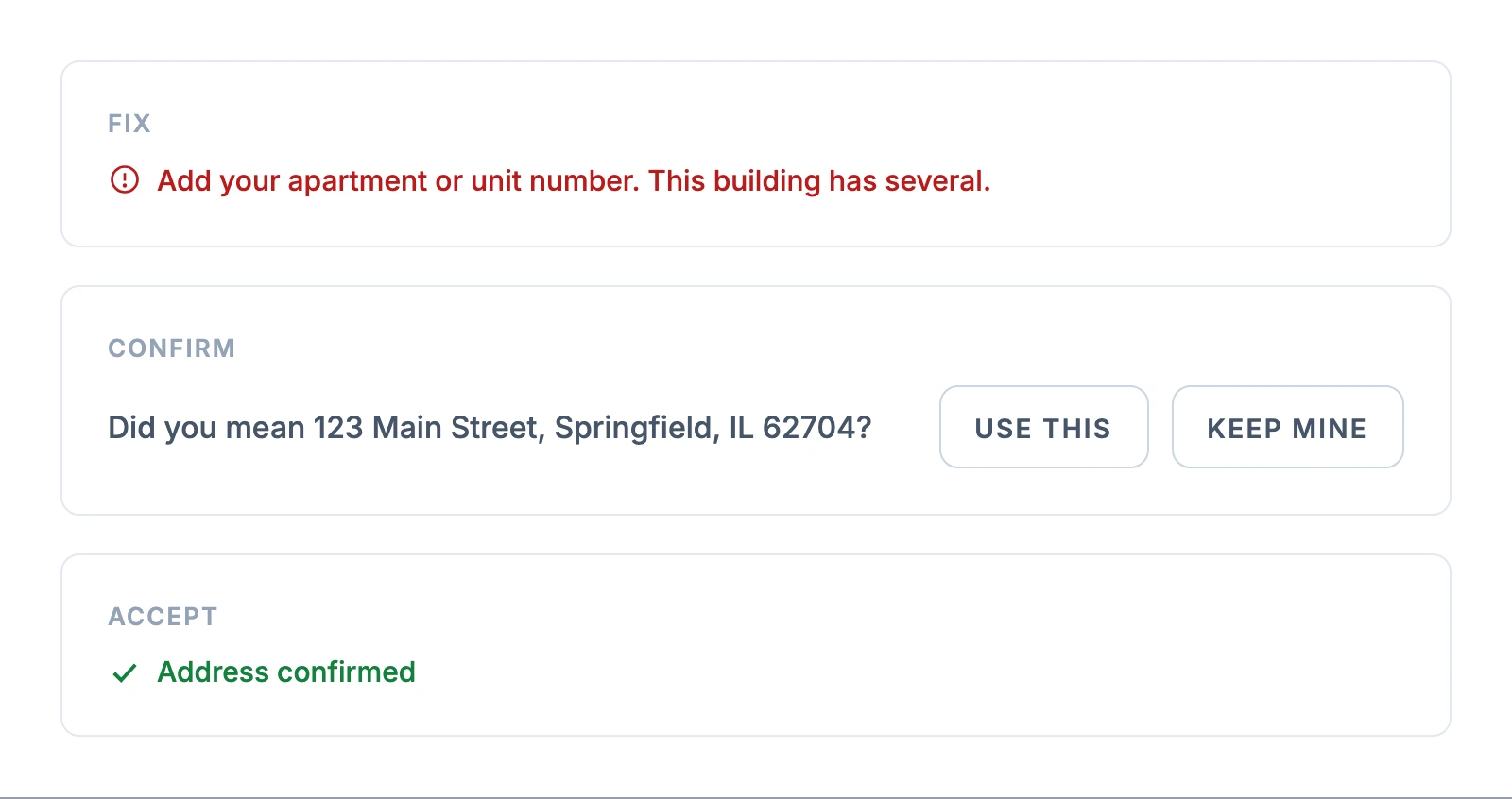
- Fix — the address is incomplete. Say exactly what's missing: "Add your apartment or unit number. This building has several."
- Confirm — the address is valid but the validator changed something. Show the suggestion and let the shopper choose: "Did you mean 123 Main Street, Springfield, IL 62704?" [Use this] [Keep mine]
- Accept — the address is good. A small "Address confirmed" is enough, or no message at all.
The checkout error messages guide covers the wording for the other common checkout errors.
Find what's costing you orders before shoppers reach checkout
Should Shoppers Be Able to Override Address Validation?
Yes. Let shoppers keep the address they typed after a second failed check, and review those orders before they ship. Google's guidance is explicit: "provide customers up to two chances to enter their address, and on the second attempt, accept their entry, even if it does not validate."
Validators miss some real addresses. New developments, rural routes, named buildings and addresses in countries the provider covers poorly can fail a check and still be deliverable. A validator that blocks checkout turns its own data gaps into lost orders.
The guide describes two ways to let the address through:
- Force-proceed — tell the shopper the address couldn't be confirmed, and let them continue with what they typed. The step can show the suggested and entered versions side by side, as below.
- Silent acceptance — accept the address without another prompt, and flag the order for review.
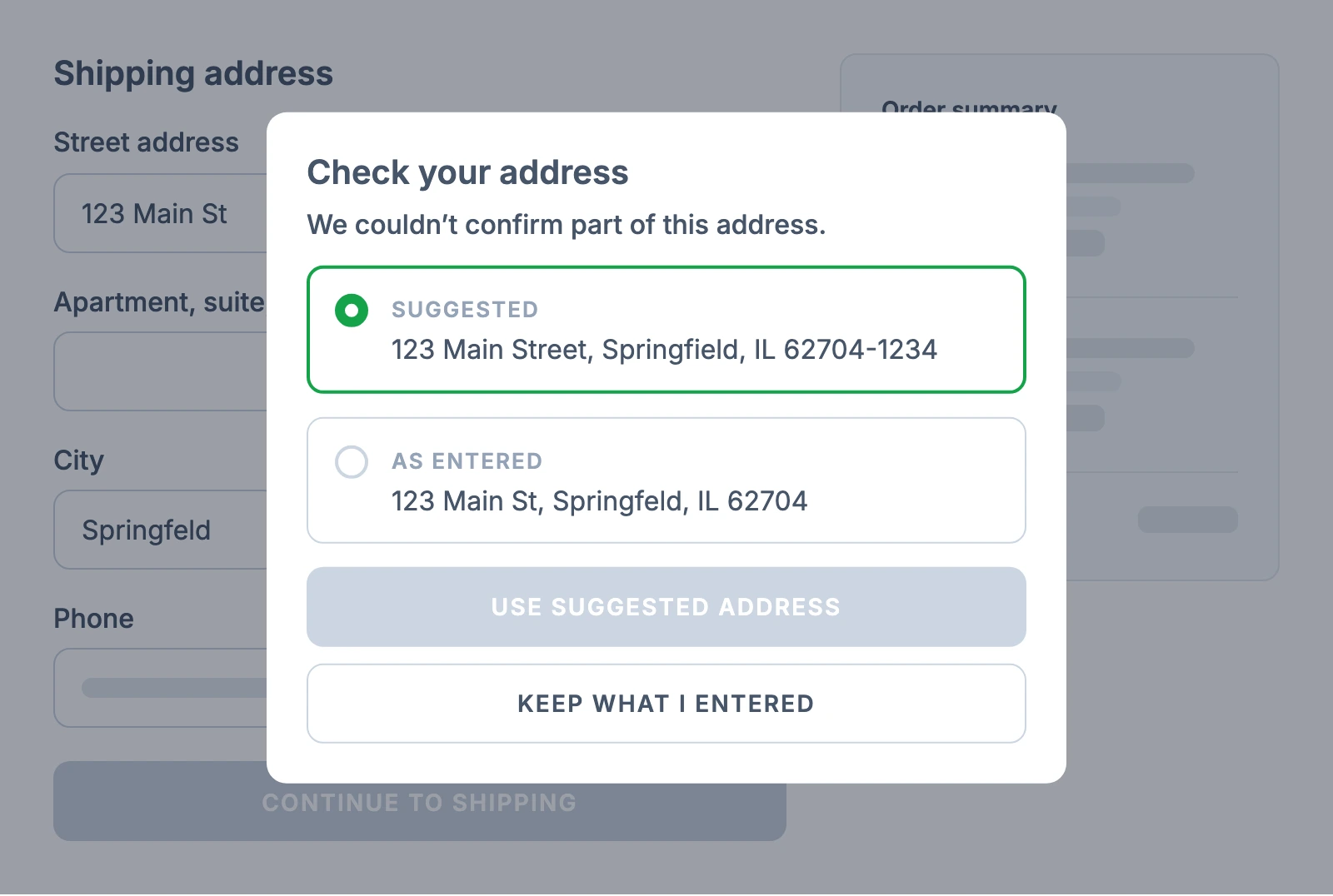
Either way, flag addresses that don't validate so that someone can review them before the order ships, as Google's guide recommends. A quick check by your support team usually costs less than a returned parcel, and it keeps the decision with a person who can email the customer.
Does Address Validation Cause Cart Abandonment?
It can add a little friction. Autocomplete tends to lift conversion slightly, which can offset some of it. Google's A/B testing guide for address validation is candid: "When you add a type ahead solution, it is usual to see a slight increase in conversion rates." Validation, by contrast, "may add some natural friction" and could lower overall conversion, which Google says "shouldn't necessarily be seen as a bad thing" if it prevents failed deliveries.
The published results are small and mostly come from vendors:
- A DevPress A/B test with about 33,000 checkout visitors at Universal Yums found a of roughly 1.5% from (DevPress). That's a , most of the store's shoppers buy on mobile, and the write-up reports no significance level.
- Wayfair cut incorrect customer addresses by 10.24% after adding Google's Address Validation API and Places Autocomplete. It also saw 22.1% fewer customer service contacts about address changes, according to a Google Cloud case study.
- Shopify's own 2017 test of Google Autocomplete showed almost 20% time savings and error reduction on mobile (Shopify).
The shopper side points the same way. In the December 2020 survey behind Loqate's 2021 report, around 41% of 3,040 regular online shoppers in the US, UK and Germany said they would abandon an order if they couldn't easily enter their address. Blocking loops and repeated prompts add friction you can avoid. Suggest a correction, allow an override after the second attempt, and measure the effect on your own checkout.
What Address Validation Costs in 2026
The tool bill is usually small next to a returned parcel. The big change is Google's: on March 1, 2025, it replaced its $200 monthly credit with a free monthly allowance for each service. These are Google Maps Platform charges for requests billed to your own Google Cloud project. If you use a platform feature or a plugin instead, check whether usage is included in its price or whether it asks for your own Google API key, and add any plugin subscription on top. Current Google Maps Platform pricing:
| Google service | Free each month | Then |
|---|---|---|
| Autocomplete (New) requests | 10,000 | $2.83 per 1,000 |
| Address Validation (Pro), called on its own | 5,000 | $17 per 1,000 |
| Address Validation (Enterprise), when it closes an autocomplete session | 1,000 | $25 per 1,000 |
| Place Details (New) Essentials | 10,000 | $5 per 1,000 |
How you end each autocomplete session decides what the typing costs. Google's session pricing applies only when your integration creates a unique session token and passes the same token to the closing Place Details or Address Validation request. If the token is missing or reused, every autocomplete request is billed on its own. With a valid session, there are two common setups:
- Validation closes the session — every autocomplete request in the session is free, but Google bills the closing Address Validation call at the Enterprise rate: 1,000 free a month, then $25 per 1,000.
- Place Details fills in the address, then you validate separately — the first 12 autocomplete requests in each session are billed as ordinary autocomplete requests, and the separate validation call is billed at the Pro rate.
Two examples, assuming about five autocomplete requests and one validation per checkout that reaches the address step:
- 1,000 checkouts a month — both setups stay inside the free allowances, so about $0.
- 10,000 checkouts a month — validating inside the session costs about (10,000 − 1,000) × $25 per 1,000, roughly $225. Validating separately costs about $85 for validation plus roughly $113 for 40,000 billed autocomplete requests, roughly $200. Budget around $200-225 a month either way.
Estimate completed and abandoned address sessions separately. A completed session closed by Address Validation is billed at the Enterprise rate. If a shopper leaves before Place Details or Address Validation closes the session, Google bills the autocomplete requests individually. The two-attempt override flow can also add a second validation call for some shoppers.
On the other side of the ledger, Loqate's surveyed retailers put the average cost of a failed US delivery at about $17.20. At that estimate, preventing about 14 failed deliveries a month would cover a $225 bill, before counting support time and customers who don't come back.
Address Validation and Verification Providers Compared
Google is the default for many plugins, but the dedicated address companies often cover more countries and sell per lookup. Prices and trials as listed on each provider's site in September 2026:
| Provider | Coverage | Pricing | Free trial | Platforms |
|---|---|---|---|---|
| Google Maps Platform | Address Validation in 40 countries; autocomplete worldwide | Free allowance, then $17 per 1,000 validations ($25 when the call closes an autocomplete session) | Monthly free allowance | API; used by many Shopify and WooCommerce plugins |
| Loqate | 250 countries and territories | Prepaid credit; roughly 4-11¢ per lookup, depending on pack size, country and lookup type | 45 days | Shopify app; API |
| Smarty | US, plus international verification for 250 countries and territories | From $195 a year for 12,000 US lookups; $552 a year for 60,000 | 42 days, 1,000 lookups | API; Magento extension |
| Melissa | 250 countries | $0.03 per checkout session, capped at $100 a month (Shopify app) | 14 days | Shopify app; API |
Pick by where you ship, not by brand. A US-only store can use Google's free allowance or Smarty. A store shipping across Europe or to many countries should check each provider's coverage for its top markets before comparing prices.
How to Add Address Validation to Shopify
Start with what Shopify already includes. Shopify's help center on address collection preferences says address autocomplete is "available to all Shopify merchants and is active by default" in 23 countries. Shopify also has a native "Validate shipping address" setting under Settings > Checkout > Address collection, which can "display issues and suggestions to fix the address details at checkout automatically" in 20 countries. That list doesn't include the UK or Germany, which is where apps such as Autoaddress and zip2address below come in.
If Shopify's native validation covers your markets, turn it on and check a few test addresses. Shopify's help center warns you to use either its shipping address validation setting or a third-party app, not both at once.
Shopify also validates online-order shipping addresses after checkout on every plan; orders from unsupported countries are still inspected but may get fewer specific suggestions. Apps make sense when you need stronger validation or customer-facing correction in countries Shopify doesn't cover, PO box or address-format rules, or extra workflow features:
- Clearer.io Address Validator — flags bad addresses and suggests fixes during checkout, and can block PO boxes. First 100 orders free, then $0.06 per checkout.
- Address Validation iO — validates after checkout on all Shopify plans and during checkout on Shopify Plus, and checks email addresses too. First 500 orders free, then $0.045 per order.
- Melissa Address Validation — $0.03 per checkout session, capped at $100 a month.
- Loqate Address Validation — 45-day free trial; requires a Loqate subscription.
- Autoaddress — autocomplete for Shopify Plus stores, with validation strongest for Ireland and the UK.
- zip2address — UK address lookup for Plus stores on Checkout Extensibility only.
Only Shopify Plus stores can replace the default autocomplete with a third-party checkout app. The Shopify Plus vs standard checkout comparison covers the other checkout differences.
How to Add Address Validation to WooCommerce
WooCommerce core checks required fields and formats, but it doesn't verify that an address is deliverable. WooPayments adds address autocomplete to block and classic checkouts on WooCommerce 10.3 or later, as long as WooPayments is enabled in checkout: go to WooCommerce > Settings > General and turn on "Address autocomplete." It suggests addresses but doesn't validate them.
For validation, or for autocomplete without WooPayments, you need a plugin. Check which of the two a plugin actually does, since most WooCommerce address plugins only autocomplete.
Validation:
- ELEX Address Validation & Google Address Autocomplete — validation through EasyPost plus optional Google autocomplete in the free version; UPS, USPS and AddressFinder validation in the premium version.
Autocomplete only (these use Google Places, which doesn't include postal validation):
- Address Autocomplete for WooCommerce — by WPExperts: Google-based autocomplete with a map pin the shopper can drag, $49 a year.
- FunnelKit — Google address autocomplete comes with the paid Pro plans, not the free Builder plugin, as part of a checkout builder.
- Fluid Checkout Google Address Autocomplete — an add-on for the Fluid Checkout plugin, €29 a year, built on the current Places API.
Restrict your Google API key before you go live. Limit each key to the APIs it needs and, for browser-based autocomplete, to your store's domains. Set quota limits with enough headroom for peak traffic, then add quota and budget alerts. Budget alerts can warn on actual or forecasted spend, but they don't cap usage; only quotas do, and a quota set too low can break checkout.
Find the checkout friction costing you orders
Address Form Design That Prevents Errors
A validator catches mistakes; good form design stops many of them from happening. Baymard's checkout research gives the main levers:
- Hide "Address line 2" behind a link. In Baymard's testing, around 30% of participants came to a stop at "Address line 2", unsure what belonged there, yet around 75% of sites still show it by default.
- Fill in city and state from the ZIP code, and keep both editable. Use full address lookup where you can. In markets where postal-code detection is reliable, prefill city and region, and keep manual entry working when detection fails. About 28% of mobile sites offer neither ZIP code detection nor full address lookup (Baymard, 2023).
- Default billing to the shipping address. About 16% of mobile sites have severe issues with "billing same as shipping", and around 24% of sites assume the two addresses differ by default.
- Use the right
autocompleteattributes. Correct attributes let the browser fill saved addresses. In a Chrome study of address and payment forms, people who used autofill abandoned forms about 75% less often and spent about 35% less time filling them in. The study is correlational, but the attributes cost nothing to add.
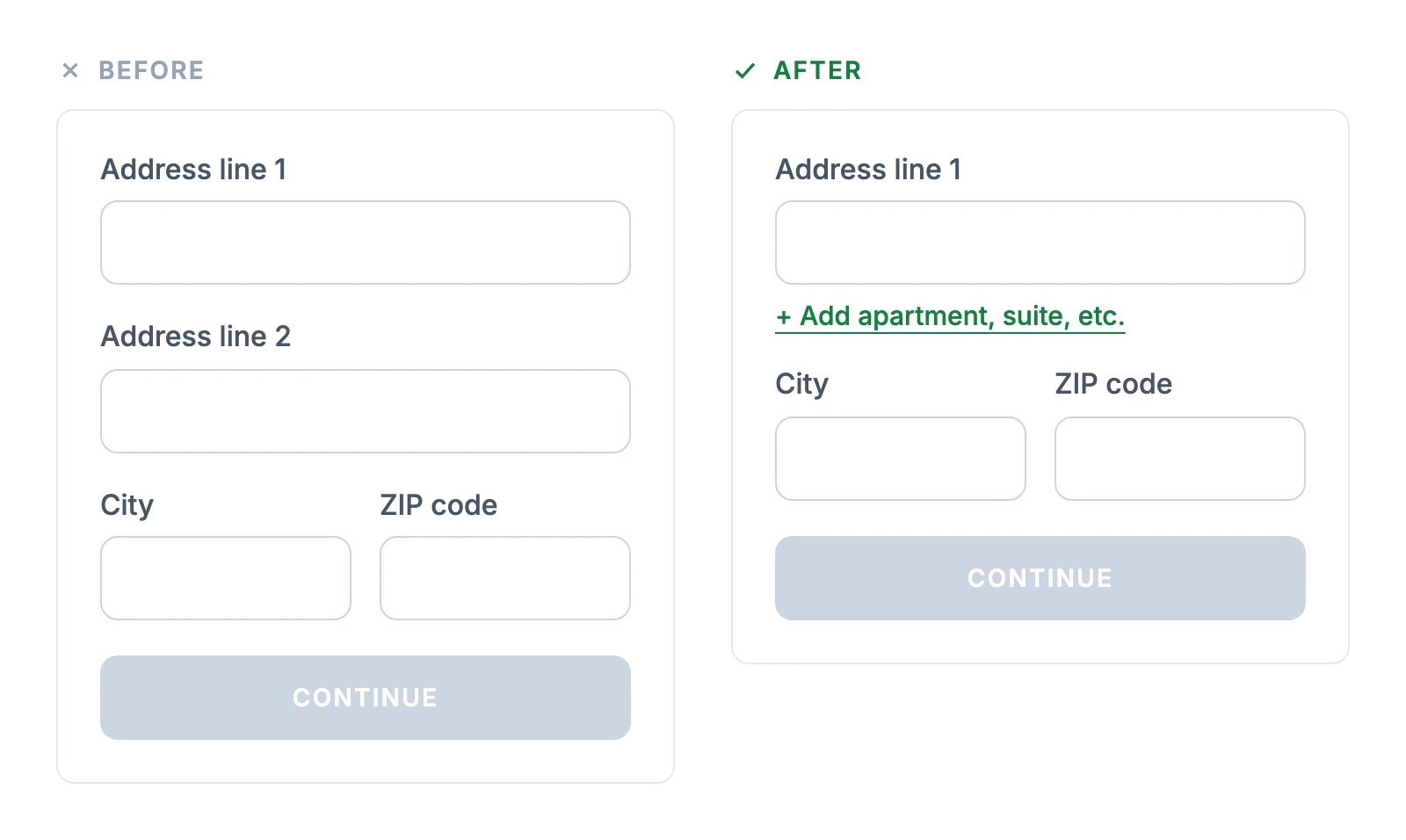
On a phone, every extra field and every blocked submit costs more. The mobile checkout guide covers mobile form patterns, and the checkout form design guide covers labels, input types and field order in depth.
How to Roll Out Address Validation
- Pull your returned and undeliverable orders for the last few months. Tag which ones had address problems, so you know your starting rate.
- Turn on autocomplete first. It's the cheapest change and usually the least disruptive.
- Add validation on the Continue button, with a confirmation step and an override. Two attempts, then accept.
- Flag unvalidated addresses for review before they ship, and email the customer when something looks wrong.
- Test the edge cases before launch, on mobile and desktop. Try a valid address, a misspelled one, one missing its unit number, a new-build or rural address, a PO box and a country the provider doesn't cover. Confirm that manual entry still works when suggestions or the API fail, that the second attempt can proceed, and that overridden orders get flagged. Repeat the test with every express payment method you offer, such as Shop Pay, Apple Pay, Google Pay and PayPal, since their addresses can skip your checkout form, and check whether they are validated during checkout or only flagged after the order.
- Compare the numbers after four to eight weeks, longer if your volume is low. Track accepted corrections, overrides, address-related delivery failures and checkout completion by country and device. The checkout optimization guide covers the rest of the checkout around these steps.
Frequently Asked Questions
Should companies allow shoppers to override address validation?
Yes. Google recommends giving shoppers up to two chances to enter their address and accepting their entry on the second attempt, even if it doesn't validate. Validators miss new and unusual addresses, so blocking checkout turns their data gaps into lost orders. Flag overridden addresses for a quick review before the order ships.
Does address validation lead to cart abandonment?
It can add slight friction, while autocomplete tends to lift conversion a little. Google's own A/B testing guide says a drop from validation isn't necessarily bad if it prevents failed deliveries. Most of the abandonment risk tends to come from blocking checkout or asking repeatedly, so suggest a correction, allow an override and move on.
How much does Google's Address Validation API cost?
Since March 2025, Google gives 5,000 standalone Address Validation calls free each month, then charges $17 per 1,000. When a validation call closes an autocomplete session, the autocomplete requests are free but the call is billed at $25 per 1,000 after 1,000 free. A store with 10,000 completed address sessions a month, each with about five autocomplete requests and one validation, should budget around $200-225 for the two together.
Does Shopify validate addresses at checkout?
Yes. Shopify has a native Validate shipping address setting under Settings > Checkout > Address collection that shows issues and suggested fixes at checkout in 20 countries (not including the UK or Germany), and address autocomplete is on by default for all merchants in 23 countries. Use either Shopify's setting or a third-party validation app, not both.
Can I validate addresses after checkout instead?
Yes. Some stores check orders before they ship instead of at checkout, which adds no friction but means contacting the customer after they've left. Shopify already validates online-order addresses after checkout on every plan, and apps such as Address Validation iO add post-checkout checks for other setups. Post-checkout review works well as a backstop for addresses that were accepted with an override.

Jakub is the founder of Ecomhint, an AI-powered ecommerce audit tool focused on UX and conversion optimization. He helps online stores identify friction points across product pages, cart, and checkout using CRO best practices and original research data.
Jakub is the founder of Ecomhint, an AI-powered ecommerce audit tool focused on UX and conversion optimization. He helps online stores identify friction points across product pages, cart, and checkout using CRO best practices and original research data.
