Shopify Sessions and Conversion Rate: How They're Counted and What Changed in 2026
Shopify changed how it counts sessions on September 21 to 23, 2026. How sessions and conversion rate are calculated now, which metrics moved, how the bot filter works, how to compare periods, and why GA4 differs.
If your Shopify sessions dropped or your jumped in late September 2026, check the calendar before you check your store. Between September 21 and 23, 2026, Shopify changed how its Analytics counts sessions, and conversion rate is calculated from sessions. Shopify's help center says plainly that orders, sales and customer counts aren't affected. The measurement changed, which doesn't mean your store did.
This guide covers how Shopify counts sessions and conversion rate now, what changed and in which direction, and how the Human or bot session filter works. It also shows how to compare periods across the change and why Shopify and GA4 still disagree. It stays on measurement. For raising the rate itself, the Shopify conversion rate optimization guide picks up where this one ends.
What a Shopify Session Is
A session is one visit to your online store. Shopify tracks it with a cookie called _shopify_s, which has a 30-minute rolling expiry from its last use. A session ends after 30 minutes without activity, and the next activity after that starts a new one.
Visitors are counted separately. Shopify's guide to session discrepancies explains that one cookie identifies the device, so a visitor is really a device, not a person. A shopper who browses on a phone at lunch and buys on a laptop that evening shows up as two visitors and at least two sessions.
- Sessions — visits to the online store. One visitor can have many.
- Visitors — devices, identified by a cookie. Usually lower than sessions.
- Pageviews — pages loaded. A single session typically has several.
If your session count looks too high for the traffic you expect, check for cookie rotation. When something on the storefront keeps regenerating the _shopify_s cookie during a visit, each new value is counted as a separate session. Shopify's page shows how to spot it by watching that cookie in your browser's developer tools.
What Changed in Shopify Sessions on September 21 to 23, 2026
Shopify rolled out three changes to session measurement, listed in its help center and changelog:
- Sessions follow activity instead of ending at midnight UTC. A visit that ran past midnight Coordinated Universal Time used to be split in two. Now it stays one session.
- Some sessions without a pageview now count. Shopify's example is a customer who goes straight to checkout from a cart link.
- Identified bot sessions are filtered out by default. Before the update, they were included in session reports.
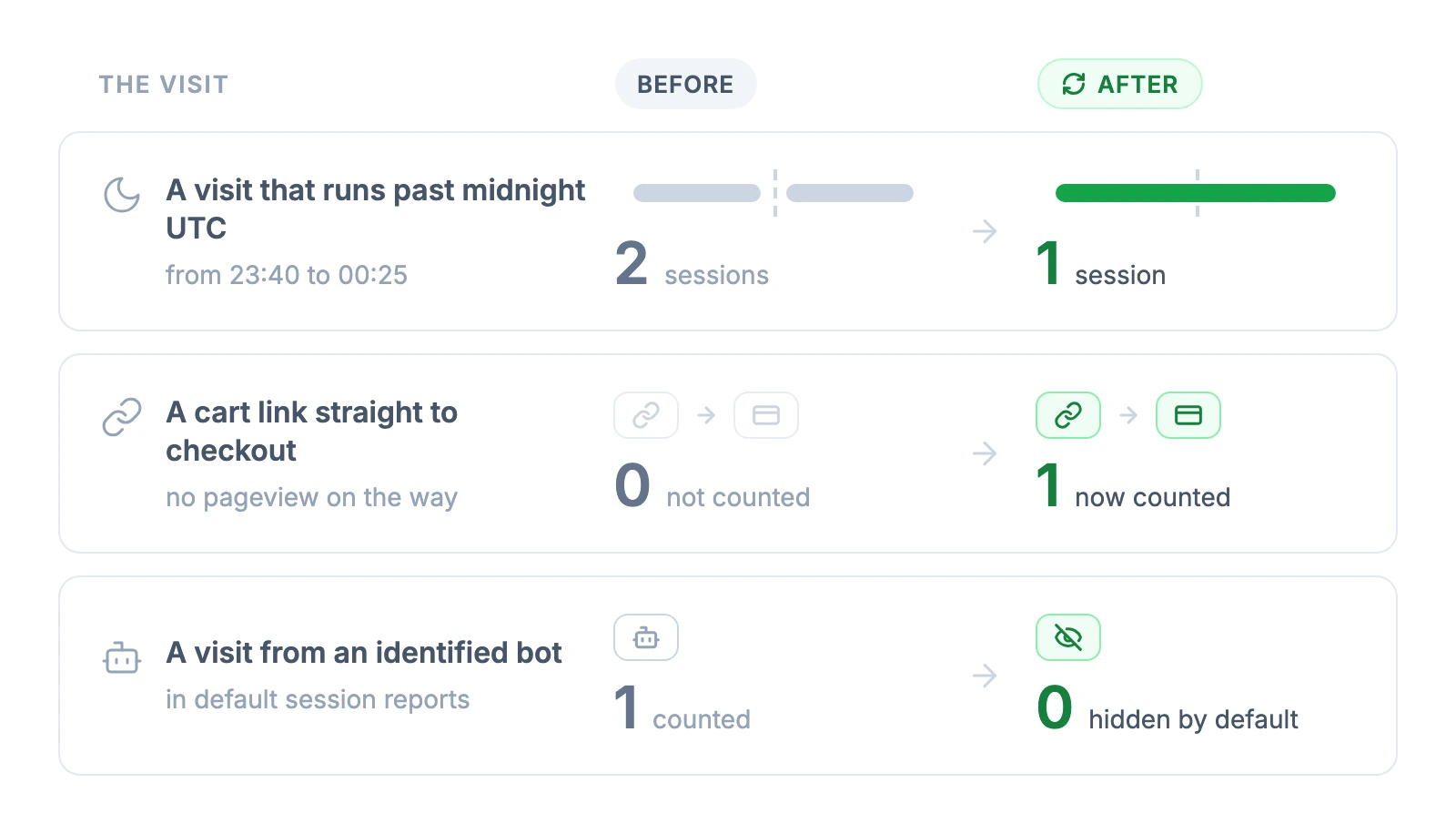
The midnight change reaches further for US stores than it sounds. During daylight saving time, midnight UTC is 8 p.m. Eastern and 5 p.m. Pacific. The old cutoff fell in the US evening, so a shopper browsing after dinner could have one visit split into two sessions. For a store whose customers are in Europe, the same cutoff fell between 1 and 3 a.m. local summer time.
Key takeaway: Before you react to a session or conversion rate change from late September 2026, check orders and sales for the same dates. Shopify measures them the same way as before the update.
Once the numbers settle, find what's costing you orders
Which Shopify Metrics Moved and Which Didn't
Every metric built on sessions can look different after the update. Shopify lists these as affected, while orders, sales and customer counts stay as they were:
| Metric | Affected | Why |
|---|---|---|
| Sessions | Yes | All three changes apply |
| Online store visitors | Yes | Listed by Shopify as a session-based metric |
| Conversion rate | Yes | Sessions are the denominator |
| Add to cart rate, reached checkout rate | Yes | Each step is divided by total sessions |
| Checkout conversion rate | Yes | Built on session counts |
| Bounce rate, pageviews per session, average session duration | Yes | Calculated per session |
| Searches | Can shift | Queries of the searches dataset across September 21, 2026 can return different results |
| Orders, sales, customer counts | No | Not session-based |
Shopify doesn't say whether your sessions will go up or down, and the three changes pull in opposite directions. Counting sessions without a pageview adds sessions. Filtering bots and keeping visits that cross midnight UTC together removes them. Which effect wins depends on how much bot traffic your store received, how often shoppers arrive through cart links, and when your customers shop.
The knock-on effect on conversion rate follows from the arithmetic. With the same number of converted sessions, fewer total sessions push the rate up and more sessions pull it down. As an illustration, 200 converted sessions out of 10,000 is a 2.0% rate, and the same 200 out of 9,000 is about 2.2%. The pageview change can add converted sessions too: a shopper who follows a cart link straight to checkout and buys can now count as a converted session.
Shopify hasn't published how large the change is for a typical store, so treat any single percentage quoted online with caution until you have a few weeks of your own post-update data.
How the Human or Bot Session Filter Works
Session reports now hide identified bots by default. Reports that support the Human or bot session filter let you adjust it to review bot sessions too, as Shopify's help page explains. Not every surface has the filter:
- Home and Live View — show session data without the filter. Identified bots are removed and you can't change that.
- Search and product recommendation reports — filter identified bots automatically and don't show the filter.
- Headless storefronts — for some setups, the available filters and session behavior can differ, depending on how storefront analytics are implemented.
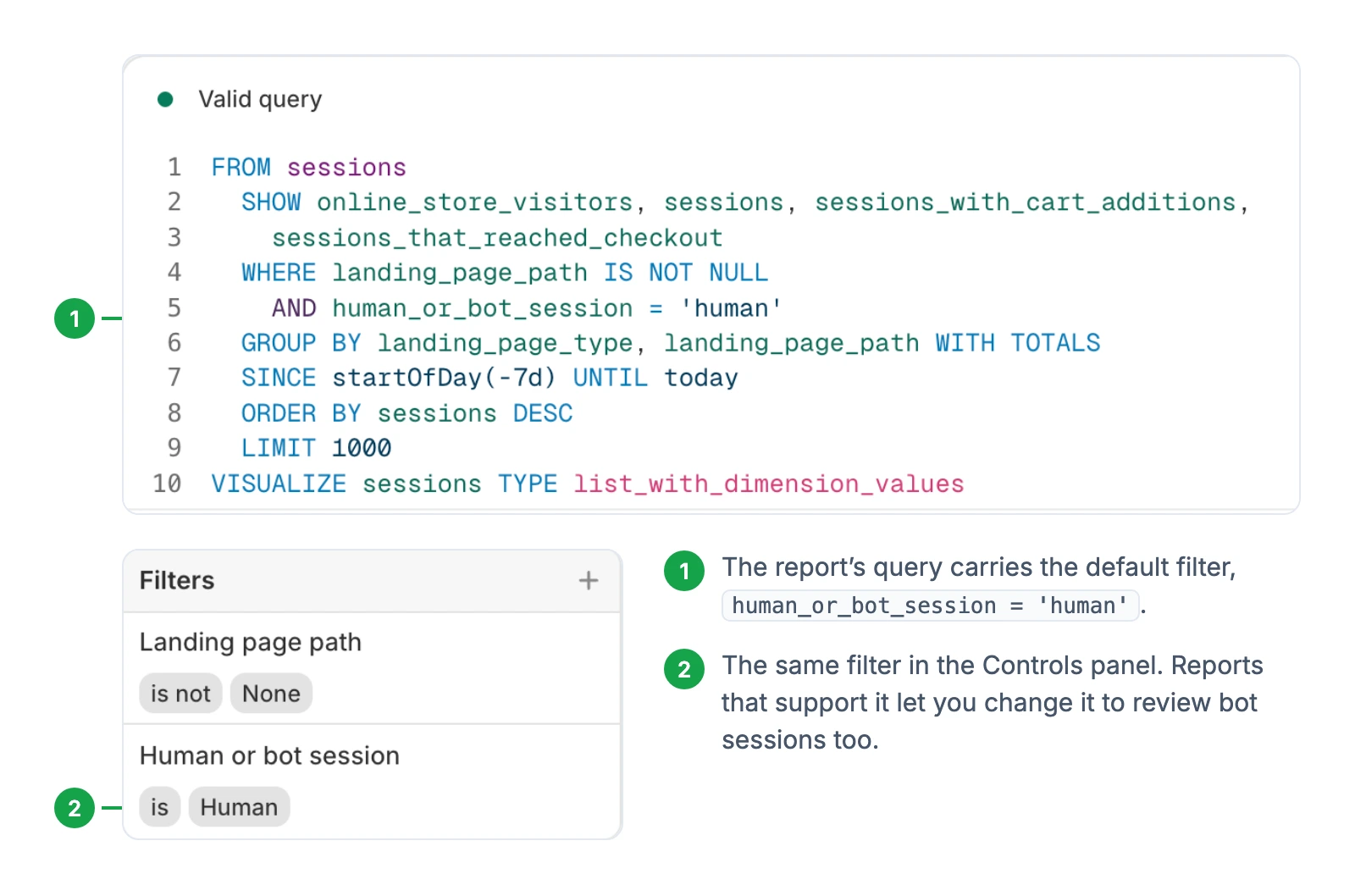
Bot filtering can't reach back before October 7, 2025. "Bot classification applies only to sessions from October 7, 2025 and after, and it isn't applied to older sessions," the help page says. Your historical data isn't deleted or reprocessed, but anything older than that date can't be filtered the same way.
The filter only removes bots that Shopify identifies. Sessions that aren't identified as bots are still counted as regular sessions. Automated traffic is common: Imperva's Bad Bot Report 2026 puts it at more than 53% of all web traffic in 2025, across all kinds of websites. AI agents, which the report says increasingly "act on behalf of users," are a newer part of that automated traffic. Shopify's help page doesn't say how visits from shopping agents are classified, so if your numbers move in ways orders don't explain, compare the human and bot views before drawing conclusions.
How to Compare Shopify Periods Before and After the Change
Shopify's changelog tells merchants to treat the update as a new baseline for session-based metrics. Three dates decide which comparisons still hold.
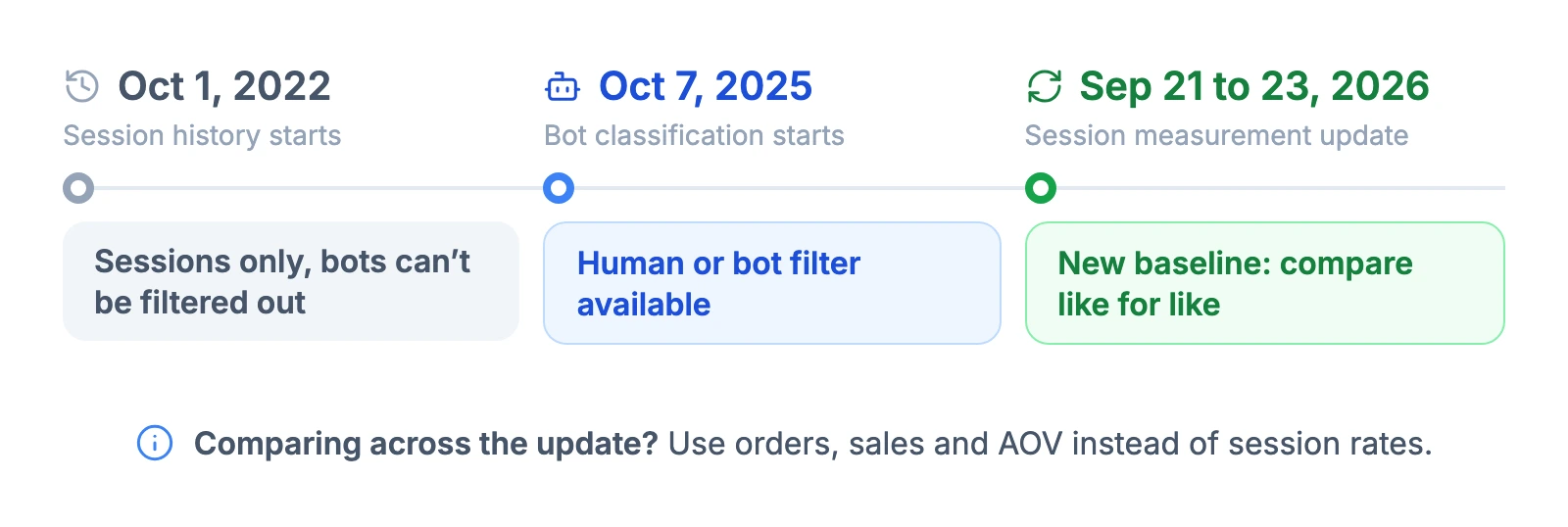
Session history itself is limited: historical data for session-based metrics goes back only to October 1, 2022. Within that window, Shopify's review steps and its notes on historical data come down to this:
- Compare two periods that both fall after the update. Go to Analytics > Reports, open a session report such as Sessions by landing page or Sessions by device, set a date range after September 23, 2026, and compare it with another post-update range.
- Use the same Human or bot filter value in both periods. A filtered period next to an unfiltered one measures two different things.
- Check orders, sales and customers for the same ranges. Shopify's guidance is that if session metrics changed "but your orders, sales, and customer counts stayed the same, then the update might explain the difference."
- For bot-filtered comparisons, stay after October 7, 2025. For anything older, review both periods without the Human or bot session filter, as Shopify's page suggests.
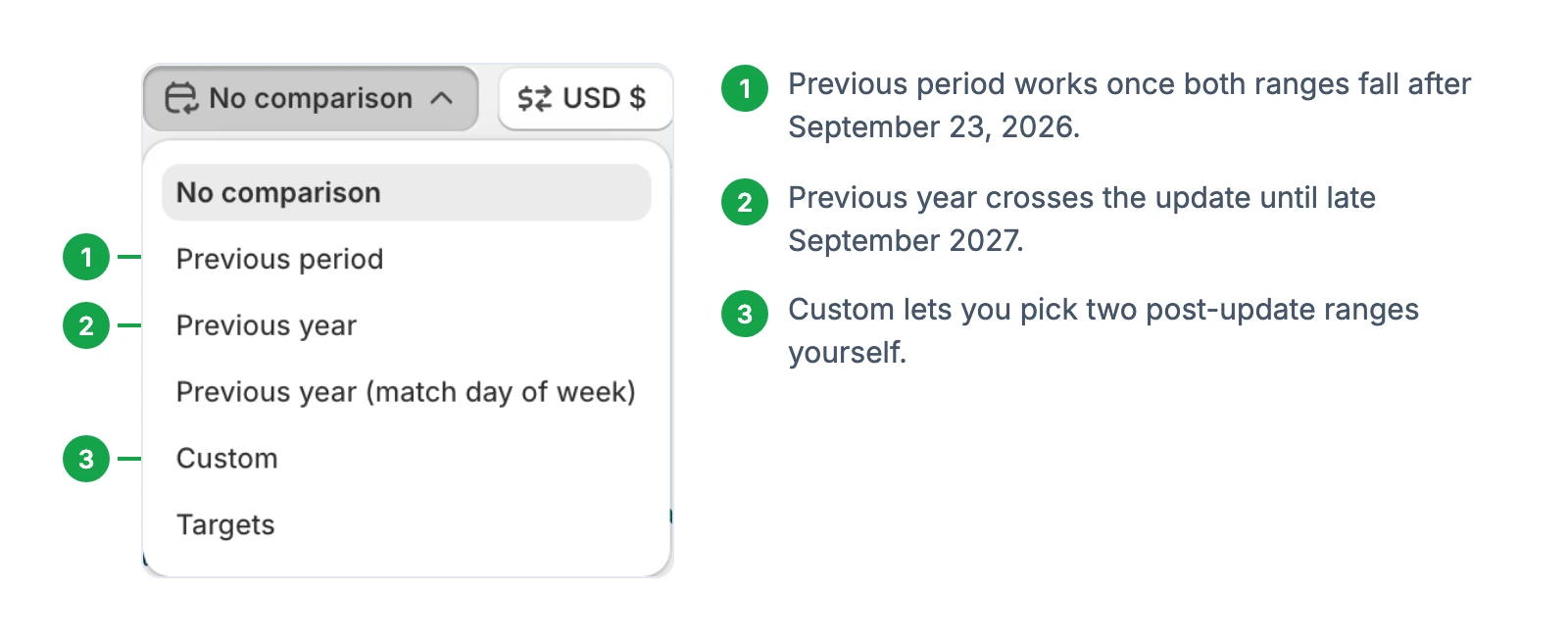
Even with the filter off, a period before September 21 and a period after it aren't measured the same way, because the midnight and pageview changes still apply. For comparisons that cross the update, rely on orders, sales and , and read session-based rates as indicative only.
A few situations need extra care:
- Year-over-year reports — until September 2027, any comparison with the same period last year crosses the update. Compare orders and sales, and note the change next to the chart.
- A/B tests — a split test that sends both variants traffic at the same time stays valid, since both are measured the same way on any given day. A before-and-after "test" that straddles September 21 doesn't. An A/B test sample size calculator shows how long a proper split test needs to run. Feed it a post-update conversion rate as the baseline.
- Apps and custom reports — Shopify warns that apps using its session data can see that data change, and that custom reports with session metrics need a review. The report editor may show a notice when a query crosses September 21, 2026.
- Audit baselines — if you're planning a Shopify store audit with before-and-after numbers, take both snapshots after September 23, 2026.
Check your store against a fresh baseline
How Shopify Calculates Conversion Rate
Shopify defines conversion rate as "the percentage of sessions that resulted in a purchase". Shopify's conversion rate counts converted sessions, not orders. A customer who places two separate orders in one visit is recorded as two orders but counted as only one conversion.
The in the Conversion rate breakdown report uses three steps:
- Sessions with cart additions — sessions where a customer added a product to the cart.
- Sessions that reached checkout — sessions with "user input (for example, a key press or mouse click) during checkout." Opening the checkout page without interacting doesn't count.
- Sessions that completed checkout — sessions where a customer made a purchase.
Each step is divided by total sessions, not by the step before it. Shopify's help page states that the rate for each step is "the number of sessions for a step divided by the number of total sessions." That's why the update moves the whole funnel at once: when the total changes, every step's percentage changes with it, even if shoppers behave exactly as before.
The gaps between steps still tell you where to look, as long as you compare them within the same measurement period and read the right view. In an open funnel, Shopify counts sessions that enter at any step, so a shopper who goes straight to checkout appears under reached checkout without a cart addition. The closed funnel counts only sessions that complete the steps in order, and hovering over a step shows its Reached this step and Dropped off rates.
Diagnose drop-off in the closed funnel. There, a large drop from cart additions to reached checkout often points to the cart, which the cart abandonment guide covers. That gap also includes shoppers who opened checkout and left without any recorded input, such as a key press or mouse click, because those sessions don't count as reached. A drop between reached and completed checkout points to the checkout itself.
Two more rules shape the number. Conversions follow a last-click model, so a purchase is credited to the session where it happened rather than the ad that first brought the customer. And where a cookie banner is active, Shopify collects data from visitors in those regions only after they consent, which shows up as lower session counts and changed conversion rates.
Once you trust the measurement, the question becomes what to fix. The CRO benchmarks from 190 audited Shopify stores show which conversion elements stores most often miss.
Shopify Analytics vs GA4: Why the Numbers Still Differ
After the update, Shopify and GA4 agree on midnight. Google's GA4 vs Universal Analytics comparison page says GA4 sessions "aren't restarted at midnight or when new campaign parameters are encountered", and both end a session after 30 minutes of inactivity, a timeout GA4 lets you change. Plenty of other rules still differ:
| Rule | Shopify Analytics | GA4 |
|---|---|---|
| Session timeout | 30 minutes of inactivity | 30 minutes by default, adjustable per web stream |
| Midnight | No split since the September 2026 update | No split |
| Bots | Identified bots filtered by default, adjustable in some reports | Known bots excluded automatically; can't be turned off or measured |
| Cookies and consent | Data from visitors in banner regions only after consent | Depends on your consent setup |
| Time zone | Your store's reporting time zone | Your GA4 property's time zone |
Shopify's discrepancy page adds more reasons: browser extensions can block , some visitors don't allow cookies or JavaScript, and the two tools handle page reloads and bot definitions differently. How much consent choices cost GA4 depends on your setup. In Google's advanced consent mode, tags still send measurements without cookies when consent is denied, and Google Analytics uses them for modeling. In basic mode, nothing is sent before the visitor consents. Expect the two tools to disagree, and watch the gap between them rather than trying to make the numbers match.
To make the comparison as fair as possible:
- Line up the time zones before comparing daily numbers.
- Treat Shopify orders as the reference and compare GA4's purchase events against them for the same dates and time zone. If the gap is large, check consent settings and browser blocking first, then whether the purchase event fires on every order.
- Mark September 21 to 23, 2026 on your GA4 reports as well. If the Shopify-to-GA4 session ratio shifts that week and your GA4 setup didn't change, the Shopify update is the likely explanation.
What to Do After the Update
- Add a note for September 21 to 23, 2026 to every dashboard and spreadsheet that tracks sessions or conversion rate.
- Reset your targets. Any conversion rate goal set on pre-update data needs a new baseline from a few weeks of post-update numbers.
- Check the apps and custom reports that read Shopify sessions, and ask their developers how they handle the change.
- Run one report with bots included in the Human or bot session filter to see how many sessions since October 7, 2025 Shopify identified as bots. It shows how much of your traffic Shopify treats as automated, not the full effect of the update, because the midnight and pageview changes landed at the same time.
FAQ
What does the sessions number in Shopify mean?
It's the number of visits to your online store in the selected period. A session ends after 30 minutes without activity, so one shopper who comes back later in the day creates a second session. Since the September 21 to 23, 2026 update, identified bots are left out of the default count.
What's the difference between sessions and pageviews in Shopify?
A session is a visit, and a pageview is each page loaded during that visit. One session usually includes several pageviews. Pageviews per session is one of the metrics Shopify lists as affected by the September 2026 update.
Why did my Shopify conversion rate change after September 21, 2026?
Shopify changed how it counts sessions, and conversion rate is the share of sessions that resulted in a purchase. With the same number of converted sessions, fewer counted sessions raise the rate and more lower it, so the rate can move even when orders stay the same. Some newly counted sessions go straight from a cart link to checkout, which can add converted sessions as well. Shopify's help page recommends checking orders, sales and customer counts for the same dates to see whether anything real changed.
Does the update change my orders or sales numbers?
No. Orders, sales and customer counts aren't affected, per Shopify's help page. Metrics built on sessions, such as conversion rate, and add to cart rate, can look different, and so can search data queried across September 21, 2026.
Are bot visits still counted in Shopify Analytics?
Identified bots are filtered out of session reports by default. Reports with the Human or bot session filter let you view them, while Home, Live View and search reports leave them out with no option to show them. Bots Shopify doesn't identify are still counted as regular sessions.

Jakub is the founder of Ecomhint, an AI-powered ecommerce audit tool focused on UX and conversion optimization. He helps online stores identify friction points across product pages, cart, and checkout using CRO best practices and original research data.
