Free Shipping Threshold: How to Set It and Show It (2026 Guide)
How to set a free shipping threshold from your own order data, what it costs once orders already above it ship free, how to test it, and the cart messages that help shoppers add the extra item.
Extra costs are the reason shoppers give most often for leaving a cart they meant to buy. Baymard Institute surveyed US shoppers who had abandoned a cart. Leaving "just browsing" aside, extra costs such as shipping, tax and fees were the most common reason, named by about 40%. A free shipping threshold is one common answer to the shipping part of that problem: delivery becomes free once the order reaches a set amount.
The short answer: set the threshold slightly above the order value where your orders already cluster, then test it on profit per visitor. That cluster comes from your own order data, not from a benchmark. This guide shows how to find the number, what free shipping costs, how to test a new threshold and what your cart message should say. It is written for stores that ship physical goods on Shopify, WooCommerce or a similar platform.
What Is a Free Shipping Threshold?
A free shipping threshold is the minimum order value at which a store stops charging for shipping. Below it, the shopper pays the normal shipping rate. At or above it, shipping is free. "Free shipping on orders over $75" is a $75 threshold. Whether discount codes count toward it depends on the store's settings, covered in the platform section below.
Thresholds work because a shipping fee changes two decisions at once: whether people order at all, and how much they put in the cart. Lewis, Singh and Fay studied an online retailer that had tried many different shipping fee schedules, in Marketing Science. Free shipping above a size threshold was "very effective in generating additional sales." For that retailer, though, the lost shipping revenue made the promotions unprofitable. The cost section below shows why both halves matter.
Surveys of shoppers and retailers point the same way:
- Around 81% of US shoppers say they are willing to spend more to reach a free shipping threshold, in a FedEx and Morning Consult survey of 2,103 consumers from 2024.
- About 75% of shoppers in the same survey put free shipping ahead of fast shipping.
- More than 95% of US shoppers prefer free standard delivery to paid express delivery, per McKinsey's 2024 delivery survey of over 1,000 consumers.
- About 71% of North America's 1,000 largest online retailers offered free shipping in 2024 in some form, Digital Commerce 360 reports.
- Around two-thirds of retail executives (67%) expect to raise their free shipping threshold, in Deloitte's 2026 retail outlook, which surveyed 330 executives in late 2025, mostly at retailers with $1 billion or more in revenue.
Statistics on other parts of the store, such as product pages and site speed, are grouped by topic on our research page.
The average threshold gets quoted a lot, usually as "$64." That figure comes from a 2023 Narvar sample of 48 retailers, up from $52 in 2019. It is a small sample of large brands. The $64 average can't tell you where your threshold should sit, because your order values and shipping costs are not theirs.
How to Set Your Free Shipping Threshold From Your Order Data
The clearest published method comes from Intelligems, a testing platform for Shopify stores that publishes its threshold experiments. Its guidance is to set the threshold "slightly above where your orders naturally cluster." It is blunt about the alternative: "Forget best practices. Forget benchmarks."
- Export your completed orders with the value your threshold rule will check. Shopify's order amount shipping rates use the cart value after discounts and before tax, and a Shopify free shipping discount also leaves tax out. WooCommerce uses the subtotal as the cart displays it, so tax counts if you show prices including tax, and a setting decides whether coupons come off first. Leave out refunded, test, wholesale and subscription orders, and look at each currency or market separately. About 90 days is a common window; compare seasonal peaks and heavy promotion periods separately.
- Group the orders into $5 bands and count each band. A spreadsheet pivot table or histogram does this in a few minutes.
- Find the cluster, the run of bands where orders bunch up, or in the guide's words, where "multiple orders group within a small range (e.g., $5) of each other."
- Set the threshold just above the cluster, rounded to a number shoppers read at a glance, such as $50, $75 or $99. Shoppers in the cluster then need one small add-on to qualify.
- Run two checks on the result. The first: "If relatively few orders fall near your threshold (e.g., less than 30% within $10), it might be too high." The second: if many orders land exactly on it, more than 50% in the guide's example, "you might be leaving money on the table."
If no cluster stands out, don't force a threshold from the chart. Keep your current policy as the control and test only values that pass the cost check below. If you see two separate clusters, check whether they belong to different markets, shipping zones or product groups, and analyze those separately before settling on one threshold.
The chart below shows an illustrative store run through these steps.
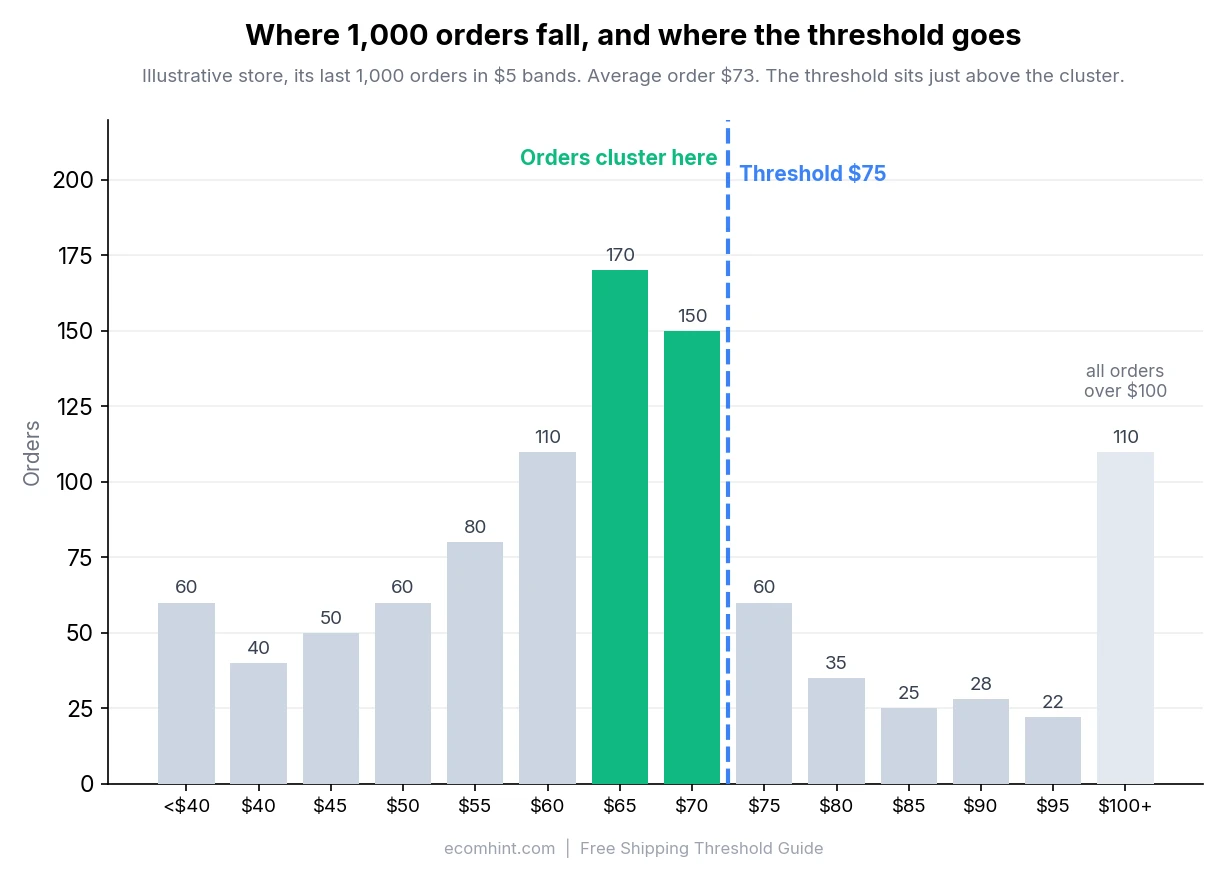
In this example, 320 of the store's last 1,000 orders fall between $65 and $75. A $75 threshold passes the first check, with 32% of orders within $10 below it. Only 60 orders land in the $75 band, so it passes the second check too. About 28% of orders already reach $75 without any nudge, which matters for the cost side covered below. If 75% or more of your orders already qualify, a guide by the Enavi agency on the Intelligems blog suggests asking whether you need a threshold at all.
Why Average Order Value Is the Wrong Starting Point
Much of the threshold advice online starts from (AOV) and adds a percentage on top. That breaks for many stores because order values are skewed: a smaller group of large orders pulls the average above what a typical order looks like. In the example above, the 110 orders over $100 lift the average to about $73, while the middle order sits in the $65 band. Adding 30% to that average gives about $95, a threshold only around 13% of the store's orders would reach.
A threshold set well above the average often leaves most orders out of reach. The Enavi guide shows the pattern. The store's was $110.46, but most orders fell between $51 and $100, and its $150 threshold meant only 17.49% of orders qualified. The team tested a $75 threshold, below the average. The share of qualifying orders rose to about 60%, conversion rose 6% and revenue per visitor rose 2.03%. The guide doesn't report profit, and with qualifying orders jumping from about 17% to 60%, the extra shipping could absorb much of that 2.03%. It also warns that adding 10-15% to AOV "could be sabotaging your growth."
Intelligems' documentation also offers an AOV-based rule of thumb: the optimal threshold "typically falls between your current AOV and +/- 20% above it." The wording is loose, and the Enavi store's winning $75 sat about a third below its AOV. Let the order distribution and the test result decide, not the AOV rule.
See whether your cart tells shoppers how close they are to free shipping
What a Free Shipping Threshold Costs You
A threshold changes three things at once, and only one of them shows up in AOV:
- You stop charging shipping on every order at or above the threshold, including the orders that were already that large before you offered anything. Those orders cost you the shipping fee and add nothing.
- Some shoppers add items to qualify. You gain the on what they add, and you stop charging their shipping too.
- Some shoppers who would have abandoned now buy. Those extra orders help offset the cost. Whether they or the bigger baskets contribute more depends on your margins, add-on sizes and shipping costs.
Put together:
Change in profit = extra product margin (added items + new orders)
                 + change in shipping fees collected
                 − change in shipping costs
Orders you already had mostly lose the shipping fee they used to pay. New orders add their full shipping cost.
Here is what that looks like for the example store in the chart, at a $75 threshold. The assumptions are illustrative: a 45% , and shipping that costs the store $8 an order, of which shoppers paid $6 before the change. Free shipping costs the store the $6 it used to collect. A quarter of the shoppers with carts between $55 and $75 add enough to qualify, about $10 on average.
| Effect | Assumption | Impact per 1,000 orders |
|---|---|---|
| Orders already at $75 or more | 280 orders stop paying $6 shipping | −$1,680 |
| Shoppers who add items to qualify | 128 orders add $10 each at 45% margin | +$576 |
| Shipping on those upgraded orders | 128 orders stop paying $6 shipping | −$768 |
| Result before any conversion lift | −$1,872 |
Even the upgrades lose money here: each one adds about $4.50 of margin and gives up $6 of shipping. Assume each new order reaches the $75 threshold and ships free. At a 45% margin it brings about $33.75, or about $25.75 after the $8 shipping cost. Recovering $1,872 takes about 73 extra orders for every 1,000, a of roughly 7.3% in orders at the same traffic, just to break even. In this example, the bigger baskets don't come close to paying for free shipping; extra orders have to cover the gap. The largest cost is the 280 orders that already qualified, and basket growth only covers it when add-ons are large or carry a high margin. That is why the test result that matters is profit per visitor, not AOV.
The numbers move a lot with your assumptions. If you already absorb part of the shipping cost, the orders above the threshold cost you less. If shoppers add $20 at a 50% margin instead of $10 at 45%, each upgraded order earns $10 against the $6 of shipping it gives up. The free shipping calculator runs the same comparison with your own figures.
Why the Popular Threshold Formula Misleads
A formula that circulates widely sets the threshold at AOV plus shipping cost divided by margin. With a $65 AOV, $8.50 shipping and a 40% margin, it gives $86.25. The logic is that a shopper who climbs from $65 to $86.25 adds enough margin to cover their own shipping.
It has two gaps. It assumes every order starts at the average and climbs exactly to the threshold. It also ignores the orders that were already above the threshold, which now ship free at your expense. Its usual "profit check" comes out at zero by construction, so it cannot tell you whether the threshold pays. Treat it as the point where one upgraded order breaks even, not as a threshold.
How to Test a New Threshold
Test the threshold against your current setup and judge it by profit per visitor. Most analytics don't report profit, so estimate it the same way for control and variant: product sales after discounts and refunds × gross margin, plus the shipping fees shoppers paid, minus what shipping, fulfillment and returns cost you, divided by visitors. If you only know a blended margin, call the result an estimate. AOV and conversion rate each tell half the story: a higher threshold can lift AOV while losing orders, and a lower one can lift conversion while giving away shipping.
The Enavi guide recommends running the test for at least one business cycle, ideally two. It also asks for at least 5,000 orders across control and variant, because a threshold change usually moves results by less than 10%. Work out the sample you need before launch and run the test until you reach it. An A/B test sample size calculator shows how much traffic you need to detect the lift you expect. If your store can't reach that sample in a reasonable time, call the result inconclusive rather than reading its direction as evidence. The Shopify A/B testing guide covers which tools can test shipping rules; Shopify's own Rollouts can't.
Treat published test results as examples, not a benchmark for your store. Two Intelligems customer stories and the Enavi case show what a threshold test can look like, though the customer stories share no sample sizes or test dates:
- A non-alcoholic beverage brand compared free shipping on every order with free shipping over $50 and a $4.99 fee below it. AOV rose 6.5%, from $57.87 to $61.66, and monthly revenue rose by about 3%. The write-up puts the conversion impact at "only ~3.5%" without saying which way it moved.
- A sports equipment brand with a $650 AOV raised its threshold from $100 to $500. AOV rose about 6% and revenue per visitor about 12%. The text reports no impact on conversion, while a summary card on the same page shows a 5.5% increase, so treat the conversion figure as unclear.
- In the Enavi case covered earlier, lowering the threshold from $150 to $75 raised conversion 6% and revenue per visitor 2.03%.
Two of the three tests moved the threshold up and one moved it down. The direction that wins depends on where the orders sit, which is why the order data comes first.
What Your Free Shipping Bar Should Say
The threshold only works if shoppers see it while they still have time to add something. A in the cart should change its message as the cart grows:
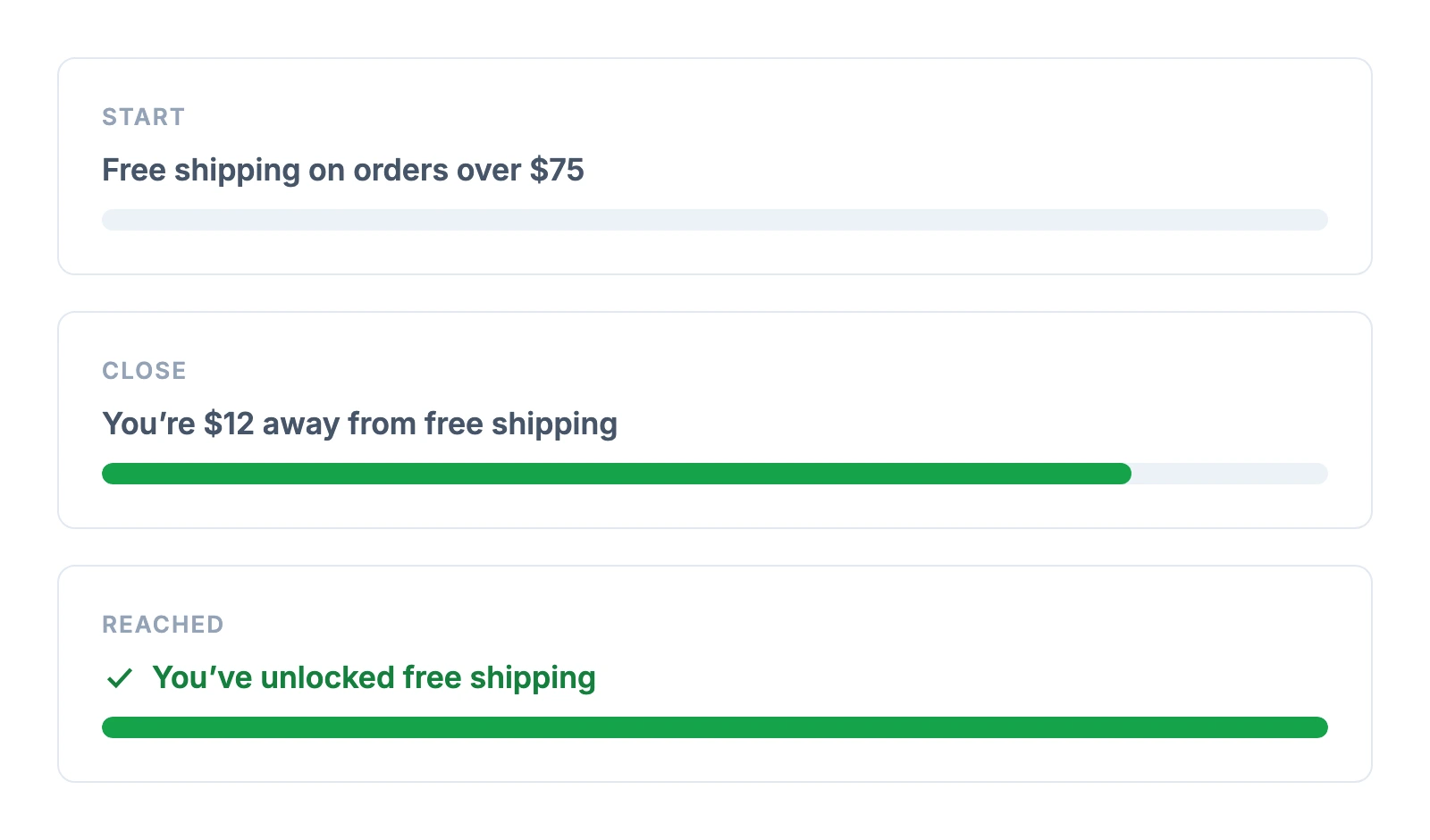
- Start with the rule. "Free shipping on orders over $75" tells a shopper with an empty or small cart what the offer is. Shopify and WooCommerce both count an order of exactly $75, so "orders of $75 or more" is the precise wording if you want to rule out any doubt.
- Say where the offer applies. If free shipping covers only some countries, services or products, put that in the message: "Free US standard shipping on orders of $75 or more." Hide or change the message when the shopper's market or cart can't qualify.
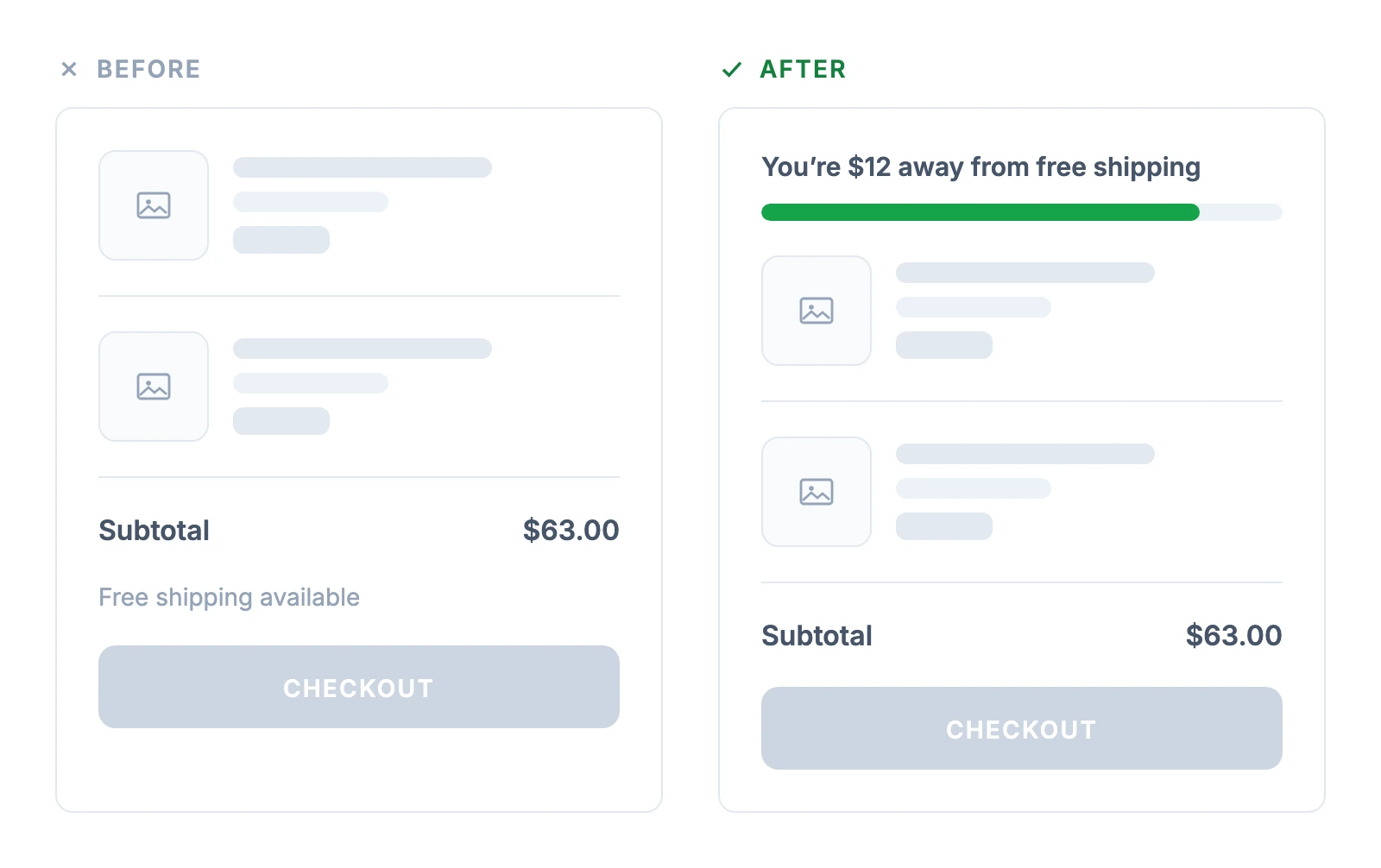
- Switch to the remaining amount as soon as there is something in the cart. "You're $12 away from free shipping" does the math for the shopper. A static line like "Free shipping available" leaves them to work it out.
- Confirm when they reach it. "You've unlocked free shipping" with a full bar tells the shopper the offer applied, which matters when the shipping line doesn't appear until checkout.
- Suggest what to add. "Add $12 more for free shipping. These items are $12 to $15." turns the gap into a product decision. Suggest only items that actually close the gap, priced after any discounts that affect eligibility, since an add-on that leaves the cart $2 short only frustrates. The cross-selling and bundling guide covers which add-ons to suggest.
- Explain a change after a discount. If a coupon pushes the subtotal back under the threshold, say so: "Your discount brought the order under $75. Add $4 for free shipping."
The difference between a static note and a live message is easy to miss in a design review and obvious in the cart:
Visibility alone can move sales. TrailCam Pro, an online retailer of trail cameras, already offered free shipping over a set order value and 90-day returns. Its site didn't mention either until the shopper reached the cart or checkout. Inflow added a small notice next to the logo in the header and reported a sales lift of 20% on desktop (93% confidence) and 23% overall (98%). The 2018 test advertised shipping and returns together and published no sample size. Read it as evidence that shoppers can't respond to an offer they haven't seen, not as the lift to expect.
Where to Show Your Free Shipping Threshold
Shoppers decide what to add on the product page and in the cart, so that is where the threshold has to be visible.
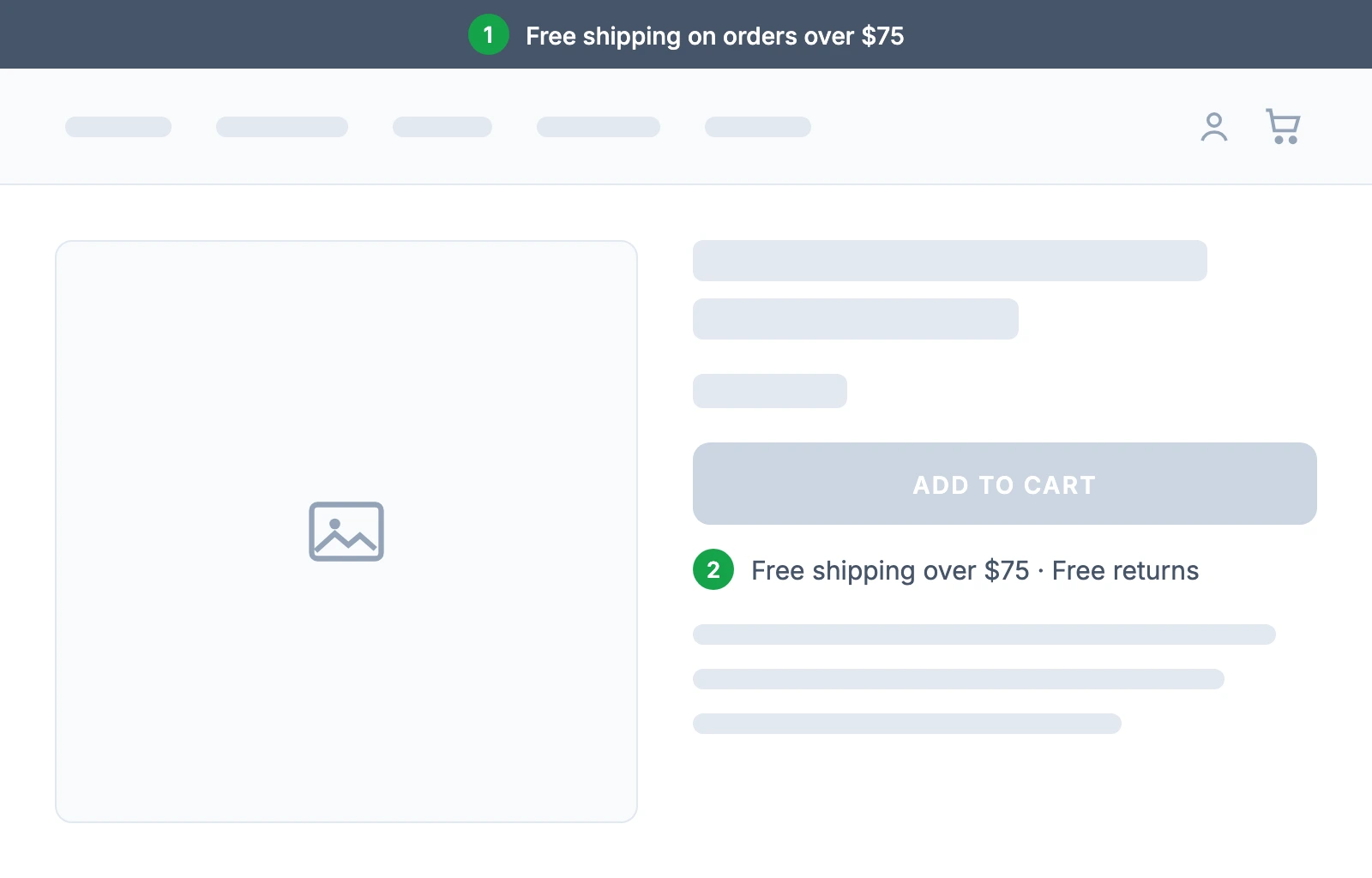
- Put it near the Add to Cart button, not only in a banner. Baymard's product page research found that about 32% of sites showed free shipping on product pages only through a banner or site-wide header. In its usability testing on one retailer's site, as many as 27% of participants missed or struggled to find the free shipping information. Baymard recommends placing it "near, but not in, the 'Buy' section," because buy sections tend to get crowded. Baymard published this research in 2017, so treat the 32% as an older benchmark; the placement advice follows from how shoppers read a product page.
- Keep the announcement bar as a reminder. A slim bar at the top of every page ("Free shipping on orders over $75") works as a second mention. A banner is easy to scroll past, so it shouldn't be the only one. Many stores skip even this: across 190 Shopify stores in EcomHint's CRO benchmark, about 49% showed no sitewide offer banner of any kind.
- Let the product page notice count down too. Once a shopper has something in the cart but doesn't qualify yet, Baymard recommends switching the product page notice to the amount left. Its example: "Spend $35 more to qualify for free shipping."
- Show the progress bar at the top of the cart and cart drawer. Above the items, the bar is visible without scrolling. The cart drawer vs cart page comparison covers which cart format fits your store.
- Confirm it at checkout. The shipping line should read "Free" once the order qualifies, so the shopper sees the offer applied before paying.
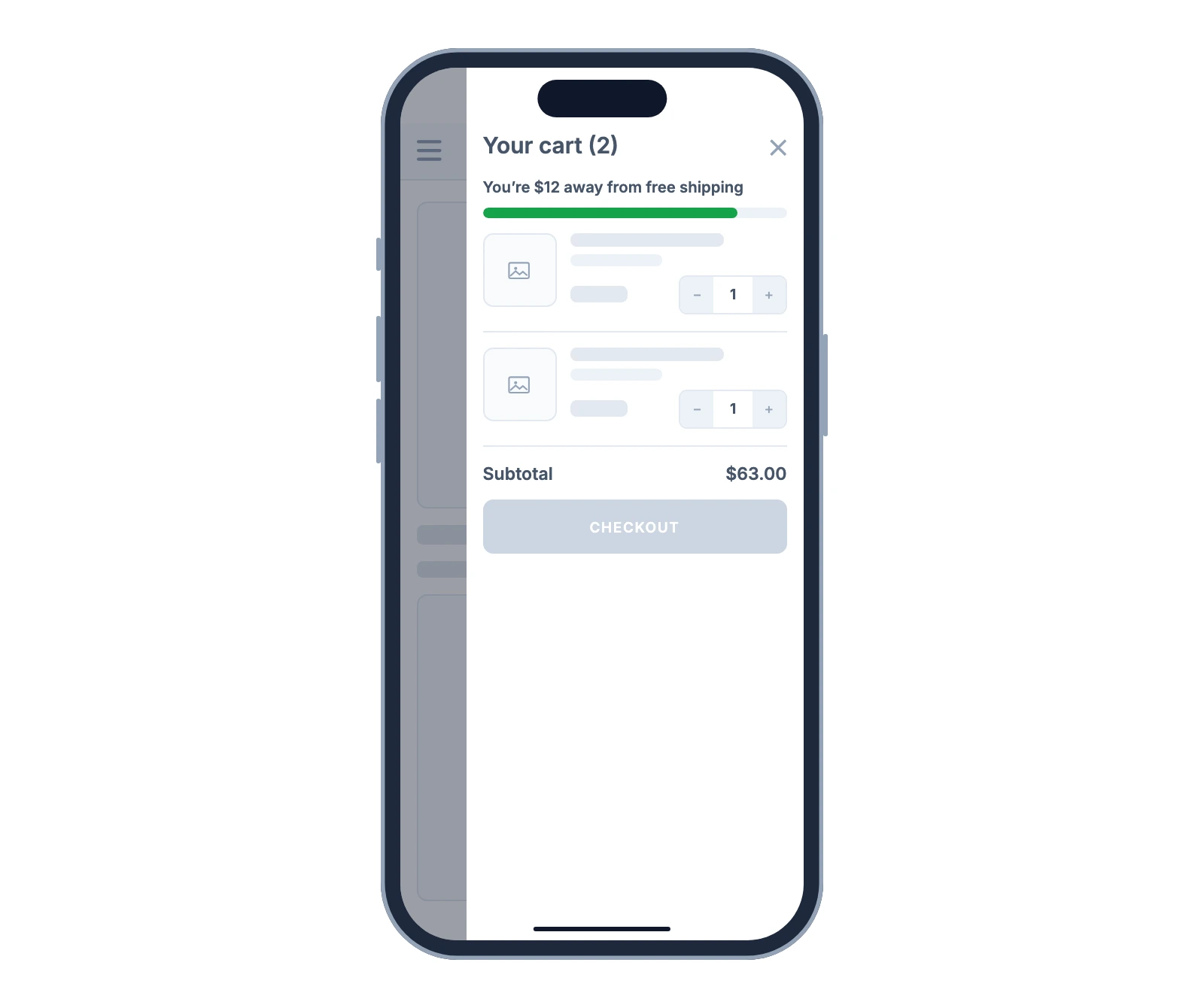
On mobile the space is tight, and a message that sits below the cart items may never come into view. A single line with a thin bar under the drawer header is enough. The mobile checkout guide covers the rest of the mobile cart and checkout flow.
Check what your product pages and cart tell shoppers about shipping
How to Set Up a Free Shipping Threshold on Shopify and WooCommerce
Both platforms handle the threshold itself natively. Neither ships a free shipping progress bar in its default cart, so the message usually needs an app, a plugin or theme code.
Shopify
Shopify offers two ways to set the threshold. Use a shipping rate when free shipping is a permanent part of your offer, and a discount when it is a promotion.
For a shipping rate, Shopify's help center gives these steps:
- From your Shopify admin, go to Settings > Shipping and delivery.
- Open the shipping profile you want to change, then click Add shipping option in the shipping zone.
- Name the option. From the Rate type menu, select Order amount, enter your threshold in the Minimum field, and leave Price empty or at 0.
- Click Done, then Save.
Keep a paid rate for orders below the threshold, for example $0 to $74.99 for a $75 threshold, unless an existing flat or carrier rate already covers them. Then test a cart below, exactly at and above the threshold in every zone you ship to.
You can also add free shipping to a rate you already have: edit the shipping option, select Offer free shipping, and enter the minimum order amount. If you use tiered order amount rates, leave the Maximum field empty on the highest tier. Shopify warns that an order outside every tier gets a shipping error at checkout. When a cart holds products from more than one shipping profile, Shopify combines the applicable rates, so set matching free shipping rules in every profile and test a mixed cart. Shopify is moving shipping settings to "shipping options by market," so the menus can look different on some stores.
For a promotion, create a free shipping discount under Discounts > Create discount > Free shipping, as a code or an , and set a Minimum purchase amount. The minimum counts product prices only, never taxes, and it uses discounted prices when the discounts can be combined.
Dawn and Horizon, Shopify's reference free themes, don't include a free shipping progress bar in the cart. If you added Horizon's Details block from its preset, it includes a placeholder "Free shipping over $50" line, so change it to your threshold or remove it. For a live bar, install one of the free shipping bar apps in the Shopify App Store or add it in theme code.
WooCommerce
In WooCommerce, the threshold is a setting on the Free shipping method. The WooCommerce documentation gives these steps:
- Go to WooCommerce > Settings > Shipping > Shipping zones and edit the zone.
- Click Add shipping method, choose Free shipping and give it a name.
- In Free shipping requires, choose A minimum order amount and enter the threshold in Minimum order amount. Other options combine the minimum with a free shipping coupon.
Decide how coupons count before you launch. The Apply minimum order rule before coupon discount box is unchecked by default, so WooCommerce checks the minimum after the coupon. The documentation's example: a $30 cart with a $10 coupon counts as $20. Check the box if you want the amount before the discount to count.
WooCommerce itself has no progress bar either. Extensions in the WooCommerce Marketplace, such as Cart Goals, add one to the cart, mini cart, checkout and product pages.
Show the Same Threshold in Google Merchant Center
If you run Google Shopping ads or free listings, give Google the same threshold so your listings show the right shipping cost. In the Merchant Center shipping settings, the option is "Free shipping over a specific order value." You can also send the free_shipping_threshold attribute in your product feed, for example US:75 USD, which Google defines as "the minimum order cost above which shipping is free." Use the attribute only when the offer has a single shipping service level for that country, because Google applies the threshold to all shipping attributes for the offer there. Google warns not to set a minimum order value if you still ship and charge for smaller orders.
Common Free Shipping Threshold Mistakes
Copying a Competitor's Number
A competitor's threshold reflects their order values, margins and carrier rates. Start from your own order distribution, then compare it with competitors only to check that yours isn't far out of line for your category.
Setting It Far Above Where Orders Cluster
When few orders sit near the threshold, many shoppers are likely to treat it as out of reach and ignore it. In the Enavi example, a $150 threshold on a store whose orders mostly fell between $51 and $100 qualified only 17.49% of orders. Intelligems' documentation notes that shoppers "are often willing to add 1-2 additional items." If the gap from a typical cart to the threshold takes more than one or two extra items to close, the threshold is probably too high.
Judging the Change by AOV Alone
A higher threshold tends to lift AOV, because the shoppers who stay have bigger carts. That can hide a drop in orders. Read AOV next to conversion rate and profit per visitor, and look at the shipping bill for the same period.
Hiding the Offer Until Checkout
A threshold shown only in the checkout's shipping line arrives after the shopper has decided what to buy. By then, extra costs are the top reason for abandonment in Baymard's survey. Show the threshold on product pages and in the cart. The cart abandonment statistics show how often surprise costs end an order, and the cart abandonment guide covers the other fixes.
Forgetting Returns
Free shipping changes what people buy, not only how much. Shehu, Papies and Neslin found in the Journal of Marketing Research that free shipping promotions push shoppers toward riskier purchases, which raises the overall return rate. A field experiment confirmed it. In their simulation, the extra returns and lost shipping revenue made the promotions unprofitable for the retailer studied. Count returns in the test, even when they arrive after it ends. Wait until both variants pass your normal return window, or apply the same expected return rate to each. Then deduct the refunded margin along with return shipping and processing.
Setting It Once and Leaving It
Carrier rates, prices and your product mix change, and a threshold that fit last year's order distribution can drift out of place. Re-run the order distribution check whenever prices or shipping rates change, and at least once a year.
Frequently Asked Questions
What is a good free shipping threshold?
A good threshold sits slightly above the order value where your orders already cluster, so a typical shopper needs one small add-on to qualify. Test it against your current setup on profit per visitor before you commit. The often-quoted $64 average comes from a 2023 Narvar sample of 48 retailers, so it is not a target for your store.
What percentage of orders should qualify for free shipping?
There is no fixed target. The "65% of orders" figure that circulates comes from one of three warning-sign questions in an agency guide on the Intelligems blog, not from a benchmark. A more useful check is how many orders sit near the threshold: Intelligems treats fewer than 30% within $10 as a sign the threshold is too high. If 75% or more of orders already qualify, the same agency guide suggests asking whether you need a threshold at all.
Should I offer free shipping on all orders instead of using a threshold?
Shoppers prefer no minimum, FedEx's 2024 survey found, yet only about 48% of the merchants it surveyed offered free shipping. Free shipping on every order removes the nudge to add items and costs you shipping on the smallest orders. In one Intelligems test, a beverage brand tested a $50 threshold against free shipping on everything and saw AOV rise 6.5% and revenue rise by about 3%. If your margins can carry it, test both.
How much does a free shipping threshold increase AOV?
It varies by store. In the two Intelligems customer stories cited above, AOV rose about 6% and 6.5%, but the stories share no sample sizes or test dates, so treat them as examples rather than a benchmark. The 15% to 30% AOV lifts quoted on some sites cite no test. The bigger effect can come from conversion, which is why profit per visitor is the metric to judge a threshold by.
Do discount codes count toward the free shipping threshold?
It depends on the platform and the setting. WooCommerce checks the minimum after coupon discounts by default, unless you tick "Apply minimum order rule before coupon discount." Shopify's order amount shipping rates use the cart value after discounts and before tax, so a discount code can move a cart below the threshold. A Shopify free shipping discount counts product prices only, at their discounted price when discounts combine, and never taxes. Test your checkout with a coupon before you launch, and tell shoppers when a discount moves them back under the threshold.

Jakub is the founder of Ecomhint, an AI-powered ecommerce audit tool focused on UX and conversion optimization. He helps online stores identify friction points across product pages, cart, and checkout using CRO best practices and original research data.
Jakub is the founder of Ecomhint, an AI-powered ecommerce audit tool focused on UX and conversion optimization. He helps online stores identify friction points across product pages, cart, and checkout using CRO best practices and original research data.
